

We’ve all been there. You’re mid-track in one of your sets, and it’s time to cue up the next one. So you just start scrolling through your library, waiting for something to jump out. As your track starts coming to an end, the panic sets in, and you scroll more and more frantically, and just end up picking any random tune rather than one that’s really going to hit.
The problem isn’t that you don’t have enough tunes. It’s that you just don’t know which of your tunes to play next. This is one of the problems that we get asked about the most by our members, so we thought it would be worth sharing our best advice to make the process of picking music as easy as possible.
Get your library ready
The most important work when it comes to picking your next track all happens long before you even step into the booth. Getting rid of that selection panic is all about making sure your library is properly organised and set up to make your life easy.
We’ve actually got a whole guide all about sorting out your USB, which we’d recommend reading, so here are the key points to help you pick your next track.
Know What You’ve Actually Got
Nowadays, especially if you’re using record pools (or dodgy sites) it can be super easy to just blindly download hundreds of tracks without really even knowing what you’ve got. Before you know it, you’ve got endless folders called ‘to sort later’ or tracks in one big pile, not sorted in any way.
This becomes a big problem when you’re playing out though, because if you don’t know what’s even in your library, there’s no way you can know what to play next. I’ve been in the position a few times of scrolling through my library and not even being able to remember what a track sounds like because I just downloaded it on a whim ages ago.
So, to start with, only download what you’re actually going to play in the next month or so. Then, before any new track makes it into your sets, listen to it all the way through and set your hot cues as you go. It sounds obvious, but it’s something that so often gets skipped when you’re downloading in bulk. And after all, discovering new music is a big part of why most of us got into DJing in the first place, so take the time to actually get to know it.
Narrow the Pool
The fewer tracks you’re scrolling through at once, the quicker you’ll find the right one. So set up your folders to do the filtering for you:
- Genre at the top level, e.g. House
- Subgenre inside that, e.g. Tech House
- Playlists by job inside each subgenre, e.g. warm-up, build, peak and vocals
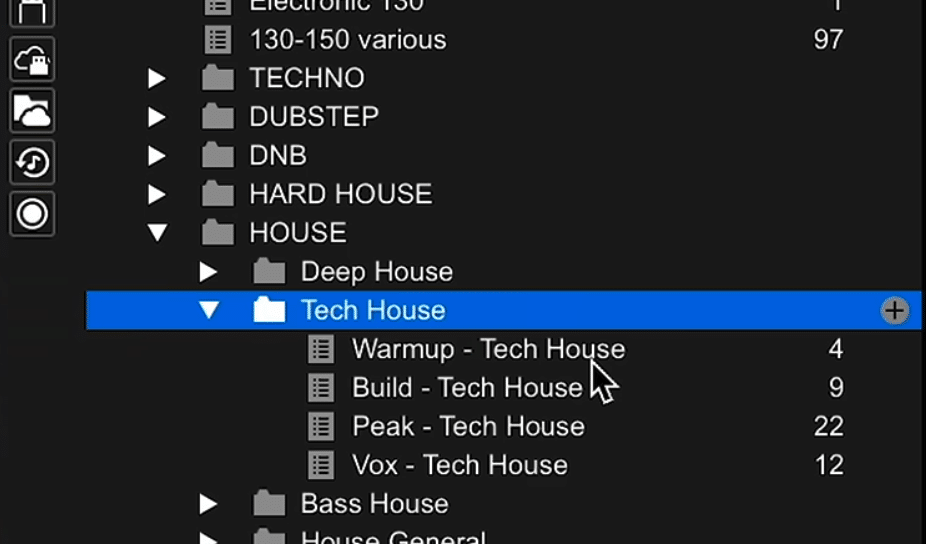
That way, when you need a peak-time tech house track, you go straight to that playlist and pick from maybe 20-30 tracks, rather than thousands.
Exactly how you set up this system is down to you, though so we don’t want to get too prescriptive. If you work best thinking about genres, go for that and don’t worry about how other people define a certain track. Or you might choose to sort by style and mood. Again, it’s your library and needs to reflect how you personally think about music.
Use Star Ratings as an Energy Scale
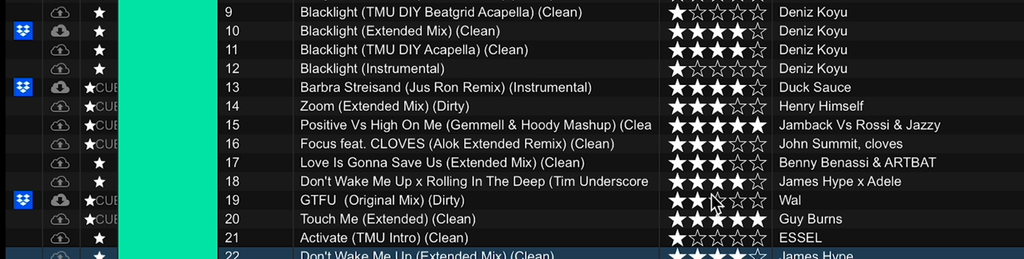
Once you’ve got your playlists sorted, you can take things a step further by using the star rating feature in rekordbox. Instead of using it to rate how much you like a track (which isn’t massively helpful – why would you have it if you don’t like it), try using it to mark how much energy each track has.
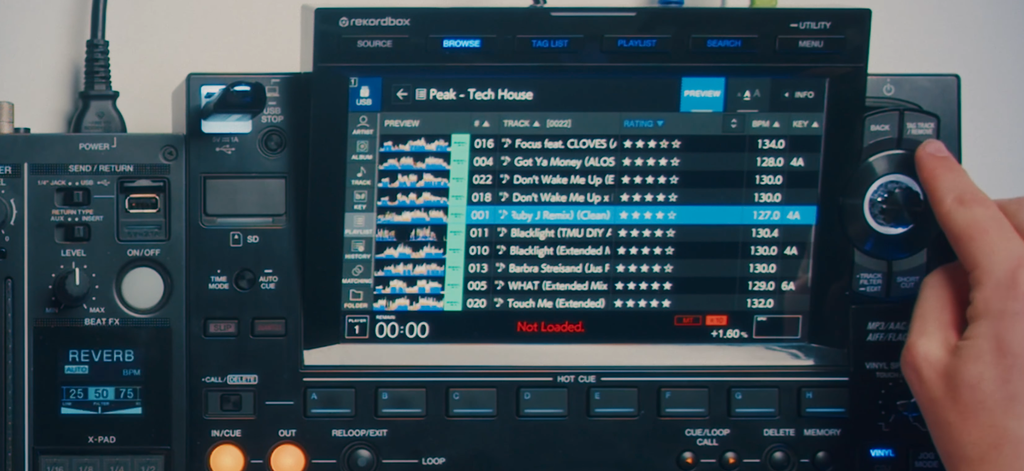
It’s also worth dragging the rating column over next to the track title so it’s always easy to see. Then, when you’re looking through a playlist, you’ll be able to tell at a glance if a track’s going to fit next and where it’s going to take the energy of your set. This comes in especially handy on the CDJs, which we’ll get into a bit later.
Build an emergency bangers folder
This is a great tip we’ve learned the hard way from needing something to fall back on when the crowd’s energy is dropping, or you’ve just got no idea where to go.
Get a folder ready full of 10 to 30 tracks that you know always land and you’ve never seen fail in front of a crowd. This doesn’t mean they’re necessarily even your favourtites, just ones you know will work. THat way, when a sets not going to plan, you’ve got something safe to fall back on.
The best way to do this is to go back into the history section of your DJ software and look back through some sets you know went well. Pick out the tracks you remember the crowd vibing with and chuck them all in the folder.
How to pick during the set
Even with the best organised library out there, you can still end up stressing out about song selection if you’ve not got a system to help you select when you’re actually behind the decks.
Get something loaded fast
This is where the prep you’ve done before starts to pay off. Say you need a big, high-energy tech house track. Go into your playlists, open the house folder, then the tech house subfolder, and into your peak playlist. From there, you can sort by rating and go straight to your five-star tracks. In a matter of seconds, you’ve gone from your whole library to just a handful of options that you know will work.
Now, that doesn’t mean there isn’t a better track somewhere else in your library. But the point is you’ve got something decent loaded on the deck, ready to go. That takes the pressure off, and you can use the time you’ve bought yourself to either look for something better or start thinking about the track that’s going to come after it.
Tag Tracks for Later
While you’re browsing, you might come across a track you like and want to drop later, but doesn’t quite fit the bill right now. Instead of trying to remember it, use the tag list.
In rekordbox, right-click the track and add it to your tag list. On the CDJs, just hit the tag button and you’ll see a red tick appear next to it. Then, whenever you need it, go into the tag list and it’ll be there waiting for you.
Use Key as a Guide
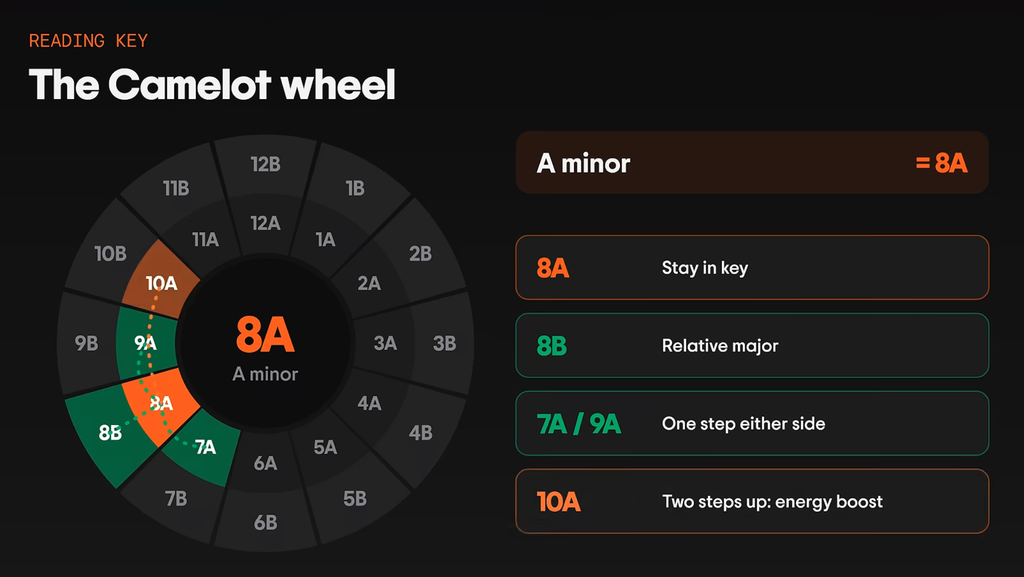
A good way to further narrow down your pool of potential picks is by key. Your DJ software will tell you what key each track is in, usually either as classic notation, like A minor, or on the Camelot wheel. The Camelot wheel uses a simple number and letter instead, so A minor becomes 8A, which makes it much quicker to understand for most DJs.
So say you’re playing a track in 8A, here are a few places you could go next:
All that said, mixing in key is just one factor that can help you decide a track and shouldn’t be a hard and fast rule. We see a lot of DJs get caught up on needing tracks to harmonically mix but this could rule out tracks that could potentially work well that don’t technically fit.
Think of the destination
DJing is a lot like chess; you need to think a few moves ahead. Say you’ve narrowed it down to three tracks that would all mix in nicely with your current one. To choose between them, think about where you want the room to be in 20 minutes or so, and pick the one that gets you closer to that place.
If you only ever match the track that’s playing, your mixes might sound clean, but overall, you could risk the set feeling a bit flat and not really going anywhere.
It can help to picture your set as a line on a graph. Is it going to keep climbing, dip first, or go up and then come back down? Once you’ve got a rough shape in mind, you can start working out how many tracks you’ll need for each part.
Change One Thing at a Time
“Energy” can be quite an abstract idea and hard to pin down, so we find it helps to break it into five separate things:
- Tempo: how fast the track is
- Familiarity: how well the crowd knows it
- Busyness: how much is going on in the track overall
- Low end: what the bass and kick are doing
- Vibe: the overall mood and feel
Now, if you change all five of these in one transition, that’s too drastic of a shift and you’ll probably end up clearing the dancefloor. But when you think about it as just shifting one or two of these things, you can change up the energy in a more controlled way.
A great trick we love to use is to have two remixes of the same track ready. That way, because its the same song, you can get away with quite a noticeable drastic change in the tempo or feel but keep a lot of continuity to stop the transition feeling too jarring.
Ready to Play Out With Confidence?
None of this will tell you exactly which track to play next. But if you can get it down to a few good options every time, you’ll always end up picking a good one. Then it just comes down to practice, building up the skills and confidence to make those calls on the fly.
That’s where Crossfader comes in. Our step-by-step tutorials are taught by professional DJs, and they help you understand not just what to do but why it works. When you create a free account, you’ll get a personalised learning journey based on your gear, music and experience, along with access to three free courses. That way, you always know what to work on next.