
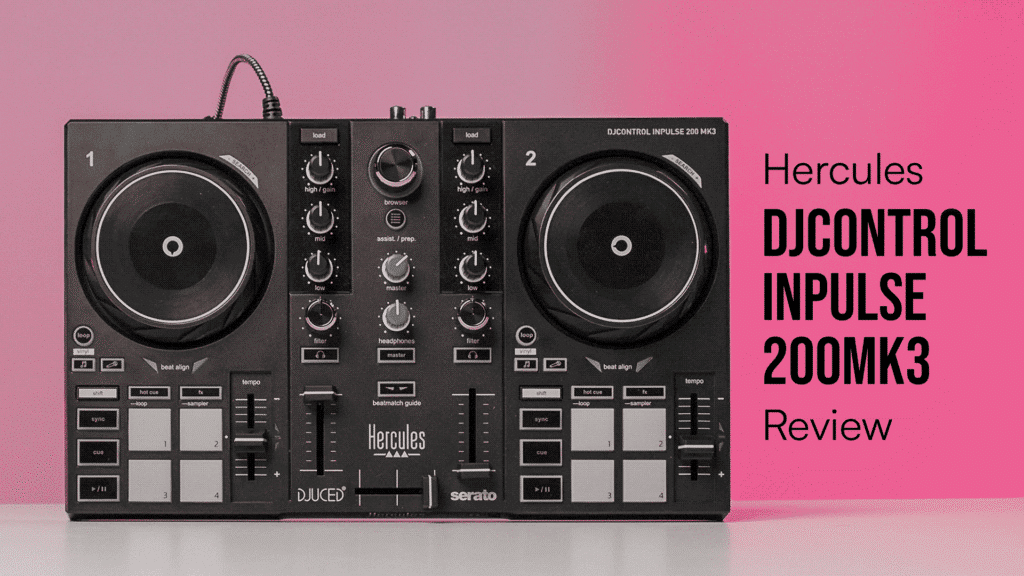
£89 doesn’t buy too much nowadays, and in terms of DJ gear usually won’t stretch far at all. That’s why we were so surprised to see the new Hercules DJControl Inpulse 200 MK3 dropping at this insane price. That’s because, unlike many other DJ controllers at this price, it’s got everything you need to start mixing, a proper layout and even a couple of features we’re not used to seeing on any budget gear.
Could this be the new go-to option for beginners looking for their first controller, or is it just another toy that’s too lacking in features to be taken seriously? Read on to find out.
Hercules DJControl Inpulse 200 MK3 Video Review
Build And Design
At first glance, there’s nothing about the Inpulse 200 MK3 that stands out as particularly unusual or different to the previous models. Everything is more or less where you’d expect it to be, with the same decks, performance pads and central mixer layout you’ll find on pretty much every beginner controller.
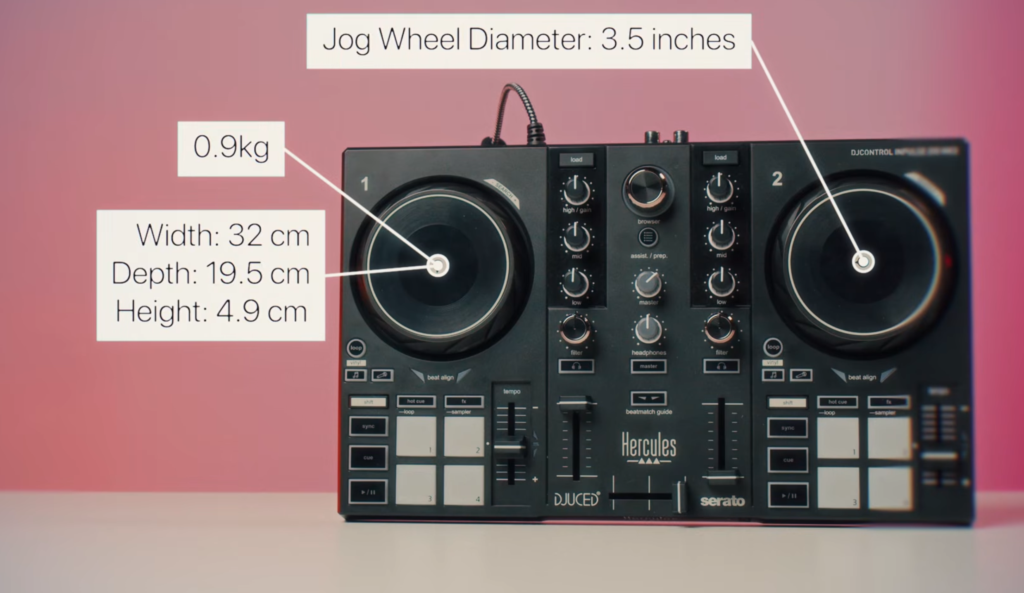
The build quality is nothing special, and its fully plastic design does feel a little cheap, but that’s entirely to be expected at this price point. One upside of this is that the unit is incredibly light, weighing in at just 0.9kg.
Overall, the unit looks a bit sleeker than some older models, with a matte-black finish we’re used to seeing on newer controllers from the likes of Traktor and AlphaTheta.
Decks
On the Inpulse 200 MK3, you get two touch-sensitive 3.5-inch jog wheels. These are about on par with what we’ve come to expect from controllers around this price point and are large and responsive enough to properly mix on and even do a bit of basic scratching. They’re certainly much better than the jogwheels you get on super cheap controllers like the Hercules Starlight, which always felt like toys.
Under the decks, you get four performance pads, which can control hot cues, effects, loops and samples.
Mixer
The mixer section of this controller is pretty bare-bones and stripped back to just the essentials you need to mix. You get a three-band EQ (not the two-band found on some budget gear) as well as a filter control. The high-end knob also doubles up as the gain for each track.
The big thing that’s missing is effects, and there are no proper effects controls built in here. These are instead handled purely by the pad effects under the mixer. Again, it comes with the super low price point that some things will have to be sacrificed, but this does give you much less control over gradually applying effects.
Stems
This is a huge upgrade on the previous models and is something that we’re really glad to see coming onto truly entry-level gear. On each deck, you’ve now got dedicated buttons to control stems and isolate the vocals and instrumentals of the tracks.
This isn’t true stems controls like we see on some gear and it doesn’t give you more granular control over individual track elements, but its a big step forward and allows beginner DJs to start trying out stems mixing.
Free Lesson:
If you’re curious about getting into stems mixing, you’ve got to watch this free lesson from our Serato Beginner course, where you’ll learn what they are and how they work on the Serato software that the Inpulse 200 MK3 uses.
Virtual Sound Card
The headline upgrade on the Inpulse 200 MK3 is something we can’t remember seeing on any DJ controller before, and certainly not on a bit of gear at this price point.
You now get a ‘virtual sound card’, which means you can send the master output audio from the decks straight to Twitch, YouTube, or Instagram, without needing an external sound card. It captures and sends this audio at 24-bit/44.1kHz, which is professional studio quality and more than good enough for any site.
This is a huge step for beginner DJs as it makes it so much more straightforward to start streaming or recording content without needing extra hardware.
Software and Compatability
The Inpulse 200 MK3 works with two different types of DJ software: DJuced and Serato Lite. DJuced is a beginner-friendly bit of software that works with Hercules gear, while Serato is a more industry-standard option that probably gives you a bit more room to grow and is compatible with much more gear. That means that, should you choose to upgrade, you won’t have to relearn anything.
In terms of music, you can stream tracks through:
- TIDAL
- Beatport
- Beatsource
- SoundCloud GO+
- Apple Music
Learning Tools
Tempo and Beatmatch Guides
One big thing that makes these Inpulse controllers stand out from the rest of the market is their built-in learning tools that help beginner DJs mix. The most famous of these is the beatmatch guide lights. These work by showing you when a track is out of sync with the master deck and lighting up which way you should nudge the jogwheel to beatmatch.
Similarly, you’ve got lights on the tempo faders that show you whether it needs speeding up or slowing down. Again, it’s potentially useful if it stops you staring at your laptop too much but isn’t a must-have.
This is potentially quite useful for beginners to learn the basics of beatmatching and develop that ear for when things are out and what way they need adjusting. It’s only ever going to be as good as your track analysis which isn’t always reliable and shouldn’t be seen as a replacement for proper beatmatching skills.
Intelligent Music Assistant
The other big tool that helps make mixing easier is the Intelligent Music Assistant (IMA). This is something that’s existed inside DJ software for a little while now, but the Inpulse 200 MK3 brings this right onto the controller. Basically, it works by suggesting songs that should work smoothly with what’s currently playing.
This, of course, isn’t something that just beginners will find handy. We’ve all had those moments where we’re struggling to figure out what song to play next and could do with a bit of help to narrow down the endless options.
But, like a lot of these music suggestion tools, it’s far from perfect and shouldn’t be something you regularly rely on.
Inputs and Outputs
The cable for this controller is a surprisingly high-quality braided USB-C connection. The major gripe with this, however, is that it’s permanently attached to the unit, so if something goes wrong with the cable (and that’s probably the first part to fail), then the whole controller won’t work. This was an issue we flagged for previous iterations of this controller, so it’s disappointing that such a seemingly easy fix is still there.
Connection-wise, you get proper speaker outputs with a stereo RCA connection. Most budget controllers like this will have a 3.5mm jack, which some may find handier for connecting an aux to a home speaker, but isn’t as ideal for hooking up more legit speakers or going into a club system.
You’ve also got a 3.5mm headphone jack on the bottom of the unit, which is controlled via the mixer section.
Is the DJControl Inpulse 200 MK3 Worth It?
At just £89, the Inpulse 200 MK3 is about as cheap as you can possibly go while still getting a ‘proper’ DJ controller.
Spend any less than this, which is only just possible, and you’re into the realm of the Hercules Starlight and Numark DJ2Go 2 Touch. These are incredibly compact controllers that are really lacking in features and feel more like DJ-themed toys.
The controller that comes closest to this in terms of price is the Numark Party Mix 2. In our opinion, the Hercules packs a lot more in terms of features and is probably the better pick for most beginners (unless you’re really sold on the lights).
To look for the nearest competitor, you’ll have to start spending a fair chunk more money. The obvious competitor is the AlphaTheta DDJ-FLX2. This comes in at £159 so is a significant step up price-wise, but it doesn’t really offer a big step-up in features and still has major compromises.
All that basically puts the Inpulse 200 MK3 almost in a class of its own when it comes to value and, in our opinion, probably sets the new standard for what’s possible at this price point.
Learn to DJ on the Inpulse 200 MK3
If you get your hands on the Inpulse 200 MK3, you need to know how to get the most out of it.
We’ll show you how to get to grips with the Serato software it runs on, learn some creative transition techniques and build a DJ career.
You can get started for free by signing up below, and there you’ll unlock a personalised learning journey, our free music pack, as well as two free courses so you can start mixing right away without any gear.