
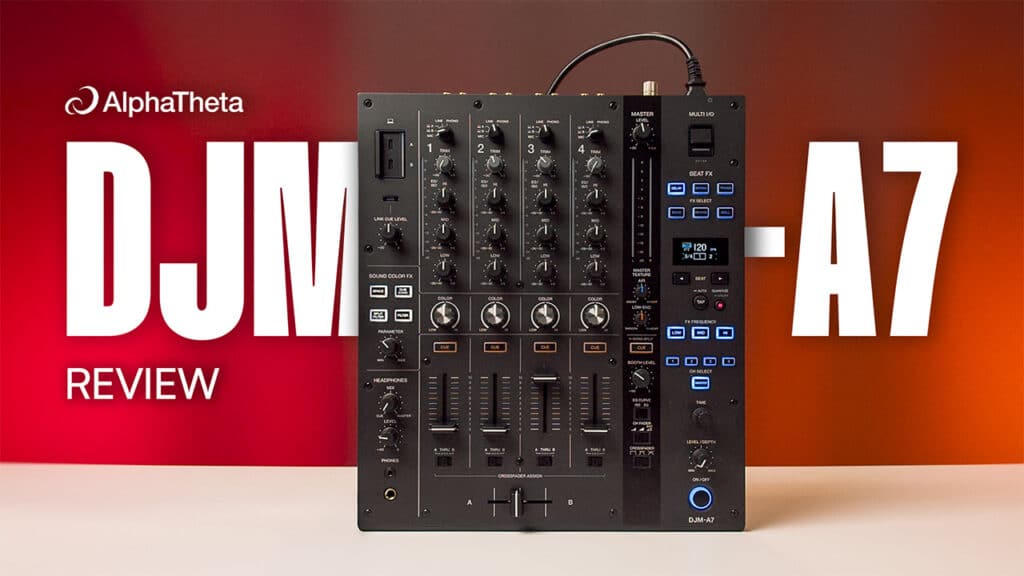
For years, the DJM-750MK2 has been the go-to mixer for DJs who want a proper four-channel club layout without forking out for AlphaTheta’s flagship prices. You’ll still find them in loads of smaller venues and home setups, but it’s well overdue an update.
There’s also always been a big jump between the 750 and the club-standard DJM-A9, which costs over a grand more. For a lot of DJs, the A9 is the mixer they really want, but it’s a bit hard to justify the extra cost.
That’s the gap the new DJM-A7 is trying to fill. It replaces the 750MK2 but borrows a lot of the A9’s layout, squeezed into the 750’s smaller footprint. As you might imagine, AlphaTheta have had to sacrifice a few features but they’ve also added a couple of interesting new ones. So is this the perfect middle ground mixer, or is it still too expensive? Let’s dive in.
The DJM-A7 gives you the A9’s layout and almost everything you’d want from a club mixer for around £1,000 less, making it an easy recommendation for small bars, clubs and home DJs. The main compromise is the effects, with only six Beat FX and no analogue send/return.
- Price: £1,369 / €1,599 / $1,599
- Release Date: 10 November 2026
- A compact, 4-channel mixer that replaces the DJM-750MK2
- Brings the DJM-A9’s layout and faders into a 750-sized footprint
- New Master Texture knobs to tune the overall sound to the room
- New Split Filter Sound Colour FX, plus six Beat FX on dedicated buttons
- Dual USB-C, built-in SonicLink and a dedicated Link Cue volume knob
- No analogue send/return or Magvel crossfader
DJM-A7 Video Review
Design and Layout
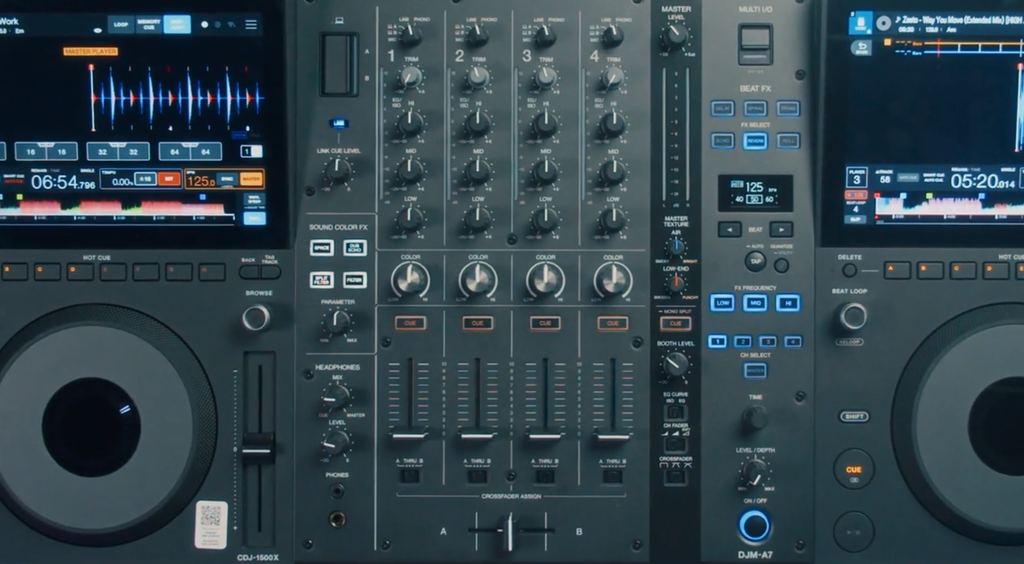
Straight away, we did notice that this new A7 does basically look like someone’s hit the A9 mixer with a shrink ray. The layout should feel pretty familiar if you’ve ever played on one of those, with everything pretty much where you’d expect it. The biggest visual change is over in the Beat FX section, where the usual rotary selector has been replaced by a row of buttons (we’ll get into that more later).
Overall, the matte grey finish is in keeping with a lot of AlphaTheta’s new gear like the CDJ-1500X that this is likely designed to sit alongside. It looks pretty slick and modern but it’s nice they haven’t gone too crazy with the minimalist design and markings at the expense of readability.
Size-wise, it’s more-or-less the same footprint as the 750MK2 it replaces, measuring 331 x 387.8 x 107.9 mm and weighing 6.7 kg (the same depth and height, just 11mm wider). Build quality feels solid throughout, with all the knobs and buttons feeling like they should withstand plenty of use.
Channels, EQ & Faders
Each of the four channels is laid out in the same way you’d get on an A9 mixer, with trim, 3-band EQ and Sound Colour FX, so nothing too surprising there if you’ve used a club mixer before.
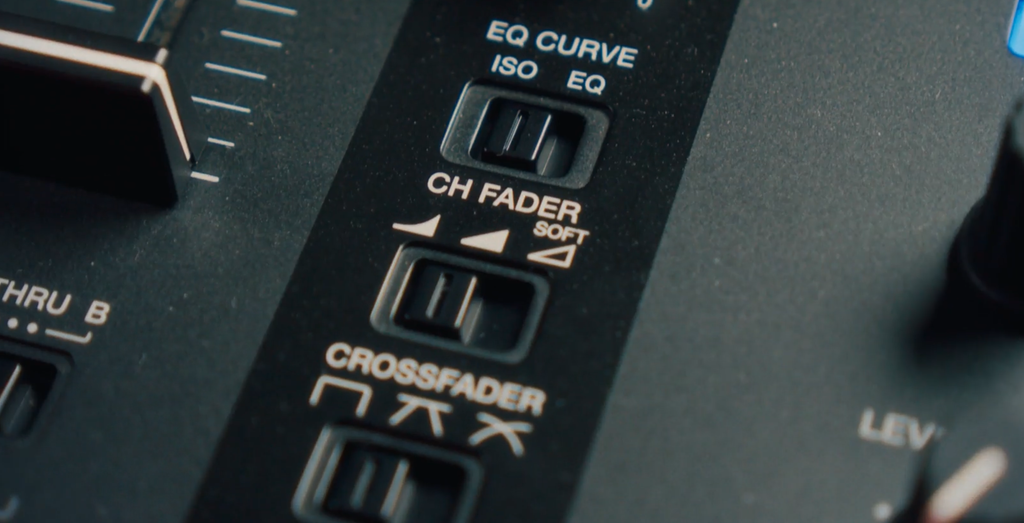
You get a few interesting settings that can change how the mixer works. The A7 gives you three options for channel fader curves:
- The first one brings most of the volume in towards the top of the fader.
- The second gives a more even fade through the whole fader’s length.
- The third one is a new addition called ‘Soft’ mode, which gradually opens up a filter as you bring the fader up, so the highs come in more gently. We first saw this on the DJM-V5, and it’s great for smoother, longer blends.
Just above those, you can switch the EQ between Isolator and EQ modes. Below them are the crossfader curve settings. Again, nothing revolutionary here but it’s good to see them.
The crossfader itself is one of the bigger changes from the 750MK2. It’s now AlphaTheta’s own in-house fader, rather than a Magvel, which AlphaTheta say they’re reserving more for their top-tier mixers. It feels nice and responsive to us, but it isn’t specifically designed for scratching and doesn’t have Magvel’s great reputation for longevity. That said, we know a lot of DJs never even touch the crossfader so it might not be an issue at all depending on how you mix.
Sound Colour FX
The Sound Colour FX section is a bit more stripped back than we’re used to on AlphaTheta’s fancier mixers but you still get four effects to choose from. Three of them will be familiar to anyone who’s used a DJM before: Space, Dub Echo and Filter. These all sound just as good as on other mixers, and you’ve still got the parameter knob to tweak things like resonance. Compared with the 750MK2, Sweep and Noise have gone to make room for Space and the new Split Filter.
The new addition is the Split Filter, which is a really cool addition that we would definitely get a lot of use out of. Basically, when you turn it to the right, it works like a high-pass filter but only on the mids and highs, so it keeps the kick and bass in. This also means it doesn’t sound as tinny and harsh when you turn it right up.
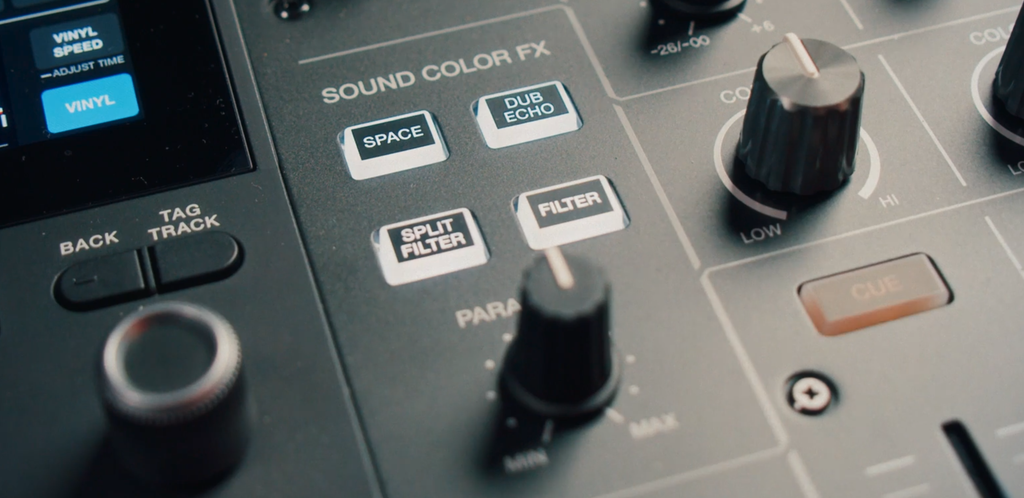
If this all sounds rather familiar, that’s because it’s essentially a lot like the cross-pass filter from the DJM-V5, just under a new name. However, it now works both ways.
When you turn it to the left, it low-passes the lows and mids but leaves the highs in. That means you still get stuff like hi-hats, while you can muffle the bass.
Beat FX
Where you’ll see things have really changed is over in the Beat FX section. Instead of a rotary selector, you now get six dedicated buttons, one for each effect:
- Delay
- Spiral
- Trans
- Echo
- Reverb
- Roll
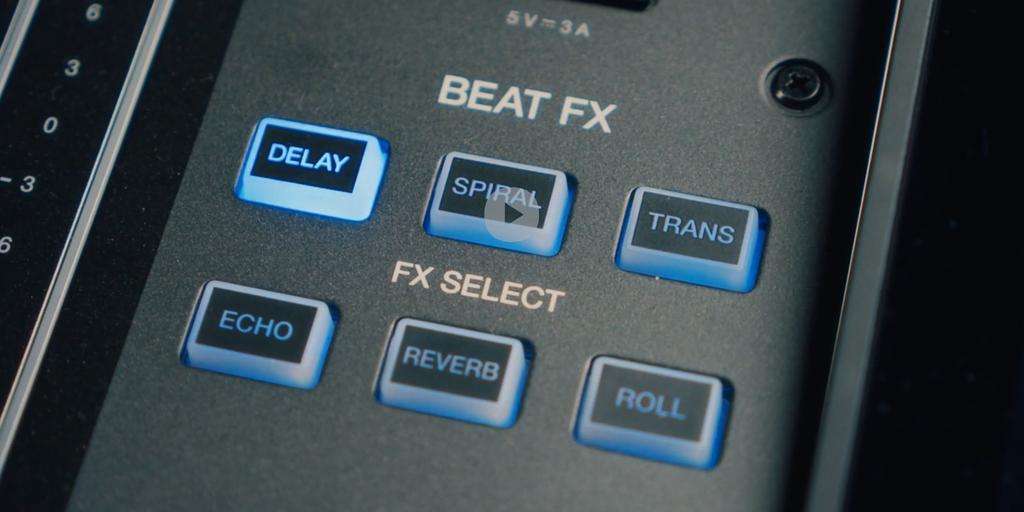
The same idea carries on down the rest of the section. There’s a button for each frequency band the effect applies to, and a button for each channel, plus one for the master. Having the physical buttons right there is in some ways better than the rotary selector as you can easily see what’s selected and quickly pick what you want.
All six of these effects sound nice and clean too, just like we’d expect. Effects are applied after the crossfader, so tails ring out even after you’ve cut the channel.
Of course, the obvious downgrade here is that six effects is a lot fewer than we’re used to. You’re losing some classics like Flanger, Helix, Ping Pong, Pitch and Vinyl Brake from the 750MK2. There’s also (less surprisingly) no X-Pad to control them.
AlphaTheta say their research shows most DJs only really use two or three effects anyway. We wouldn’t necessarily disagree with that and most of us only reach for a handful of our favourites (although I’ve personally got a soft spot for a bit of flanger…)
Because the beat effects are all software-based, it feels like a bit of a missed opportunity to have them all set in stone. It would be great if AlphaTheta gave us the chance to assign our six favourites in software to create a personal bank.
Master Texture
Over on the master channel, you’ll find the feature AlphaTheta are calling an industry first: Master Texture. Basically, you get two knobs that let you change how the whole mix sounds, to help you tune it to whatever room you’re in.
The first knob is called ‘Air’, which controls the high end and runs from Smoky to Bright. Turn it towards Bright and everything opens up. The hi-hats get crisper and more prominent, and of course the mix sounds brighter overall. Turn it towards Smoky and you get the opposite. It sort of smooths out the high end and takes the edge off without dulling things too much.
You might be thinking that’s just like boosting your high EQ, but it sounds noticeably different. When you boost the highs on the EQ, you’re also making the signal louder, and when you cut it, the track gets quieter and loses some energy.
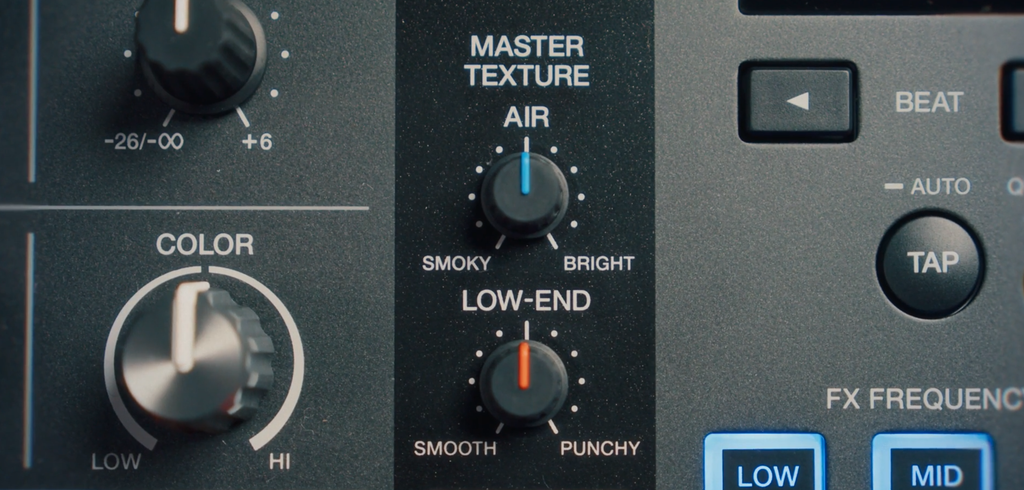
Master Texture is designed to keep everything more balanced. AlphaTheta say that, unlike EQ, it changes the texture of the sound while keeping the volume constant. So rather than just turning bits of it up or down, it changes the character of the whole mix. Bright doesn’t just make things brighter, it makes the mix feel more open, while Smoky takes the edge off the hi-hats without losing that sense of air.
The second knob, Low End, works the same way and runs from Smooth to Punchy. Turn it towards Punchy and the kick really cuts through, giving everything a bouncier feel. With Smooth, the low end is still there and still prominent, but it’s less aggressive and tames the boominess in the subs.
AlphaTheta’s own examples give a good idea of how it’s meant to be used. On a techno night with relentless hi-hats, you might dial Air towards Smoky. For bass music in a small bar, you’d ease Low End towards Smooth. And for a warehouse party where you want the kicks to hit hard, you’d push it towards Punchy. The big benefit is you can set it for the room and get on with mixing, rather than tweaking your EQs all night to fight the sound.
Headphones & Monitoring
The headphone section has the usual 3.5mm and quarter-inch outputs. The A7 also has SonicLink built in, AlphaTheta’s low-latency wireless headphone tech, which we first saw on a mixer with the DJM-V5.
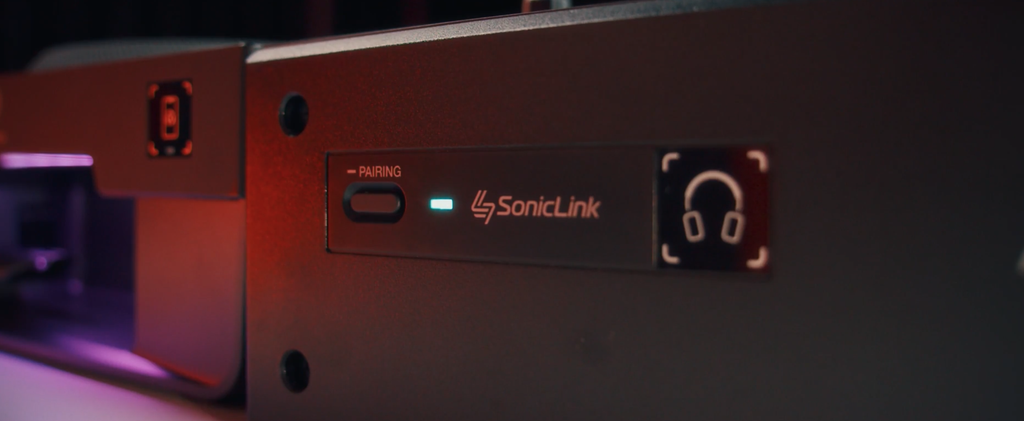
With the new HDJ-F9s, you just hold the side of the headphones up to the front of the mixer and they pair, with no transmitter needed. Other SonicLink headphones will work too, but you’ll need to pair them with the button. It’s a cool bit of tech but you still need AlphaTheta’s compatible (and not exactly cheap) SonicLink headphones to use it.
Link Cue is the more useful addition for most DJs. It lets you preview a track in your headphones from linked CDJs using Touch Preview or Touch Cue, without loading it to a channel. Now it has its own dedicated volume knob, so you can set the preview level separately and won’t blast your ears every time you check a track.
Sound Quality
AlphaTheta say the A7 has the same tuning as the A9, which means it’s clean and neutral, so your tracks sound how they should rather than being coloured by the mixer. Under the hood, it uses 32-bit converters on the channel inputs and main outputs. That’s a techy way of saying you should get nice clear sound with plenty of headroom.
AlphaTheta also told us the phono inputs have been improved over the 750MK2’s. That’s not an official spec, though, and on paper the figures are pretty much identical. We didn’t test the phono inputs ourselves, so if you play a lot of records, it’s one to try for yourself.
Connectivity
Round the back, you get everything you’d expect from a four-channel club mixer. Each channel has its own line and phono inputs, so you can plug in CDJs, turntables or other line-level gear. There’s one mic input, which takes XLR or quarter-inch jack. For outputs, you’ve got an XLR master, a jack booth output and an RCA output that can be used as a record out or a second master. There’s also a LAN port for linking up CDJs with Pro DJ Link.
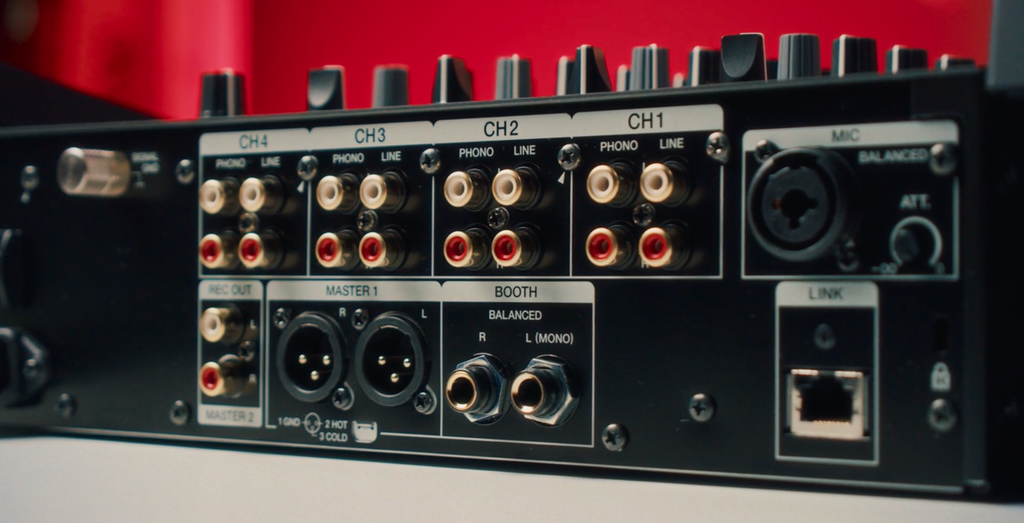
Up on the top-left you get two USB-C ports, so you can have two laptops plugged in at once for handovers. The downside is that every USB port on the A7 is USB-C, with no USB-A or USB-B like on the 750MK2. Phones with a Lightning port aren’t supported either, so check you’ve got the right cable before you turn up to a gig.
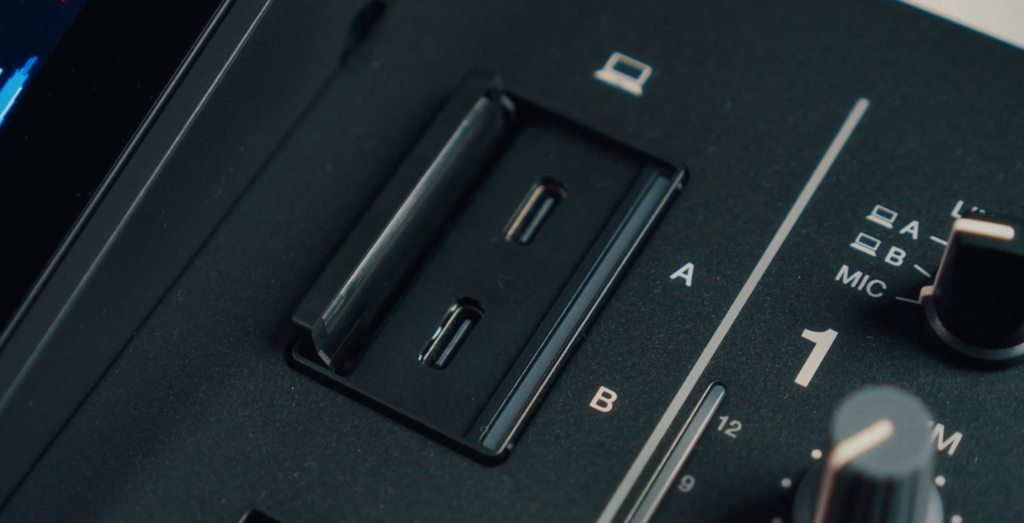
Software support is pretty good. It works with rekordbox (with no subscription needed), Serato DJ Pro, djay Pro and Traktor Pro 4. It’s also the first AlphaTheta mixer to work with djay on iOS, so you could even play off a phone or tablet. You can use DVS with rekordbox and djay iOS too.
There’s also a USB-C Multi I/O port, which lets you connect AlphaTheta’s RMX-IGNITE with a single cable for its effects. The big omission is analogue send and return. AlphaTheta told us that was cut to keep the price down, but it means you can’t plug in effects pedals or outboard units with jack cables like you could on the 750MK2.
Is It Worth It?
The A7 is clearly built for small bars, clubs and home DJs, and for those people it’s an easy recommendation. At £1,369 (€1,599 / $1,599), it’s only a little more than the 750MK2 and around £1,000 less than an A9. You get the same layout and faders as the A9, four channels, dual USB-C, Link Cue, SonicLink and a useful extra in Master Texture, all in a mixer that fits in roughly the same space as a 750.
The main compromise is the effects. You only get six Beat FX, there’s no X-Pad, and Sweep and Noise have gone from the Sound Colour FX. There’s also no analogue send and return for outboard effects. The new button layout is easier to use, and the Split Filter is a great addition. But if effects are a big part of how you mix, you’ll hit the limits pretty quickly.
If you’re thinking of swapping a controller or all-in-one for a CDJ setup, the A7 doesn’t change things much. Put it between a pair of CDJ-1500Xs and you’re still looking at £4,307, significantly more than an XDJ-AZ, which gives you better specs overall.
Overall though, we loved mixing on the A7 and never felt held back by the lower price. This definitely lowers the barrier of entry to a mixer that feels properly ‘club standard’.
Learn to Mix on CDJs
If you’re stepping up to a club-style setup like the A7, you’ve got to know your way around it. The workflow on CDJs and a proper club mixer can feel completely different to the controller you might be used to at home, and a lot of DJs end up falling back on basic mixing when they get in the booth.
That’s where our CDJ Masterclass comes in. We’ll show you how to really get to grips with a club setup, from the fundamentals right through to creative transitions and tricks that’ll make you stand out behind the decks. If you’re brand new to them, our guide on how to use CDJs is a great place to start.
You can explore this and loads more when you sign up to Crossfader for free. You’ll unlock a personalised learning journey built around your gear and goals, our free music pack and free courses, so you can start levelling up your mixing straight away.
Who Should Buy the DJM-A7?
- Running a small bar or club: Yes. Master Texture, easy handovers and a layout every DJ knows.
- Want the A9 feel at home: Yes. The same layout for around £1,000 less, in a smaller footprint.
- Stepping up from a 2-channel mixer: Yes. You get four channels and a proper club layout.
- Already own a 4-channel mixer: It depends. You gain Master Texture and the Split Filter but lose some Beat FX, the Magvel and analogue send/return.
- Scratch DJ: Try it first. The crossfader is responsive but it isn’t a Magvel.
- Use outboard FX: Deal-breaker. There’s no analogue send and return.
How Does the DJM-A7 Compare?
DJM-A7 vs DJM-750MK2
The A7 is a direct replacement for the 750MK2 and costs only a little more. You get the A9 layout, Master Texture, the Split Filter, dual USB-C and SonicLink. In return, you lose five Beat FX, Sweep and Noise from the Sound Colour FX, the Magvel crossfader and analogue send/return. For most DJs it’s the better buy, unless you rely on outboard effects or scratching.
DJM-A7 vs DJM-A9
The A9 is still the club standard, with 14 Beat FX, a colour screen, a Magvel crossfader and analogue send/return. The A7 gives you the same layout and feel for around £1,000 less, in a much smaller footprint. If effects are central to how you mix, the A9 is worth saving for. Otherwise, the A7 gets you most of the way there.
DJM-A7 vs DJM-450
The DJM-450 is the cheaper option at around £650, but it’s only a two-channel mixer. It does have more Beat FX (eight) and a Magvel crossfader. If you only ever mix two decks, it’s still great value. If you want four channels and a proper club layout, the A7 is the much better step up.
| DJM-A7 | DJM-750MK2 | DJM-A9 | DJM-450 | |
|---|---|---|---|---|
| Price | £1,369 | £1,100–£1,200 | ~£2,400 | ~£650 |
| Channels | 4 | 4 | 4 | 2 |
| Dimensions (W x D x H) | 331 x 387.8 x 107.9 mm | 320 x 387.9 x 107.9 mm | 407.4 x 458.3 x 107.9 mm | 230 x 320 x 108 mm |
| Beat FX | 6 (buttons) | 11 | 14 | 8 |
| Sound Colour FX | Space, Dub Echo, Filter, Split Filter | Dub Echo, Sweep, Noise, Filter | [CHECK] | Dub Echo, Sweep, Noise, Filter |
| Crossfader | AlphaTheta in-house | Magvel | Magvel | Magvel |
| USB | 3x USB-C | [CHECK] | [CHECK] | 1x USB-B, 1x USB-A |
| Analogue send/return | No | Yes | Yes | [CHECK] |
| SonicLink | Yes | No | No | No |
| Master Texture | Yes | No | No | No |
DJM-A7 FAQs
Yes. The DJM-A7 is AlphaTheta’s replacement for the DJM-750MK2, bringing the DJM-A9’s layout into a mixer of almost the same size.
The DJM-A7 costs £1,369 / €1,599 / $1,599 and is released on 10 November 2026.
The DJM-A7 has no analogue send and return, so you can’t connect pedals or outboard effects with jack cables. It does have a USB-C Multi I/O port for digital effects like the RMX-IGNITE.
No. The DJM-A7 uses AlphaTheta’s own in-house crossfader rather than a Magvel, which AlphaTheta are keeping for their top-tier mixers.
The DJM-A7 works with rekordbox (no subscription needed), Serato DJ Pro, djay Pro, djay for iOS and Traktor Pro 4. DVS is supported with rekordbox and djay for iOS.
DJM-A7: Key Specifications
| Launch Date | 10 November 2026 |
| Price | £1,369 (€1,599 / $1,499 ex. tax / $1,599 US) |
| Channels | 4 |
| Dimensions (W x D x H) | 331 x 387.8 x 107.9 mm |
| Weight | 6.7 kg |
| Inputs | 4x Line (RCA), 4x Phono (RCA), 1x Mic (XLR/¼” TRS) |
| Outputs | Master 1 (XLR), Booth (¼” TRS), Rec Out/Master 2 (RCA) |
| Headphones | 1x ¼” jack, 1x 3.5mm jack, SonicLink wireless |
| USB | 2x USB-C (PC/Mac), 1x USB-C (Multi I/O) |
| Other Connections | LAN (Pro DJ Link) |
| Compatible Software | rekordbox, Serato DJ Pro, djay Pro, djay for iOS, Traktor Pro 4 |
| Beat FX | Delay, Spiral, Trans, Echo, Reverb, Roll |
| Sound Colour FX | Space, Dub Echo, Filter, Split Filter |
| Sampling Rate | 48 kHz |
| Total Harmonic Distortion | 0.007% (Line – Master 1) |