
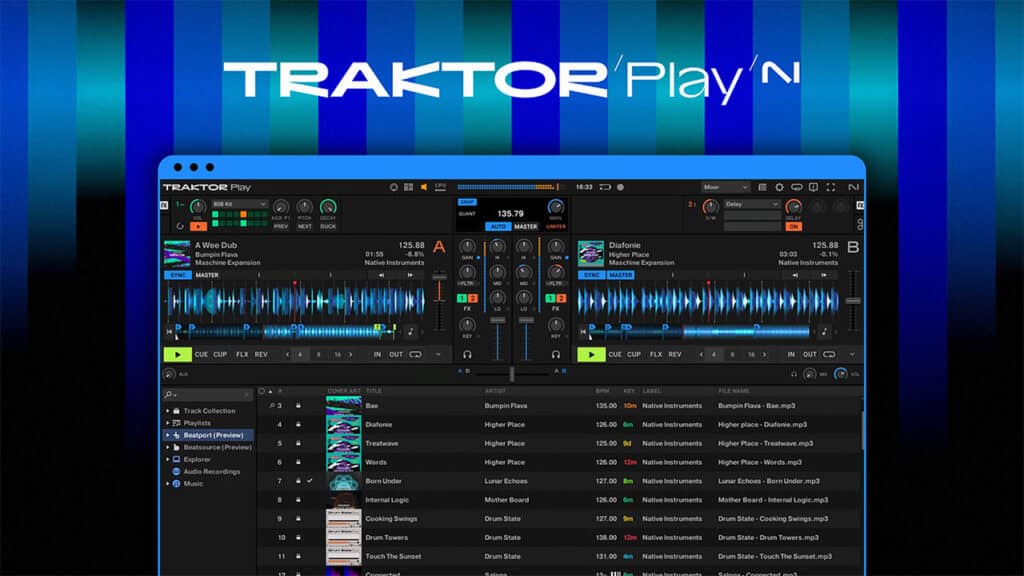
If you’re a complete beginner looking to take your very first steps into the world of DJing, you’ve got more options than ever of where to start. Most of the industry leaders have free or stripped-back versions that let you get a flavour of what DJing’s all about without having to spend a load of money or get bogged down with complex features.
Now throwing their hat in the beginner DJ ring is Traktor. They’ve been a big name in the DJ world for about as long as there’s been such a thing as DJ software, but in recent years, they’ve seemingly struggled to keep up with the flurry of updates from their competitors. However, they’ve now made some big moves with a major update to their flagship Traktor Pro software, new hardware releases and this new beginner-friendly version of Traktor.
It promises super easy-to-use functionality that can be used both standalone and with controllers, all coming in at a much lower price of £49. Let’s dive into what sets it apart from the regular Traktor, its competitors and whether it’s worth checking out.
What Traktor Play offers
Traktor Play is designed to get anyone mixing straight away, with enough controls for basic DJing, without anything too overwhelming or complex.
Traktor Play gives you:
- Key detection and correction to keep transitions smooth
- A built-in limiter to prevent distortion
- Hot cues, looping and Flux Mode for basic performance control
- Mixer FX with quick filters and delays
- A Pattern Player with an 808 drum kit for layering beats
- Simple stem controls to just mute drums.
- Professional sound engine taken directly from Traktor Pro
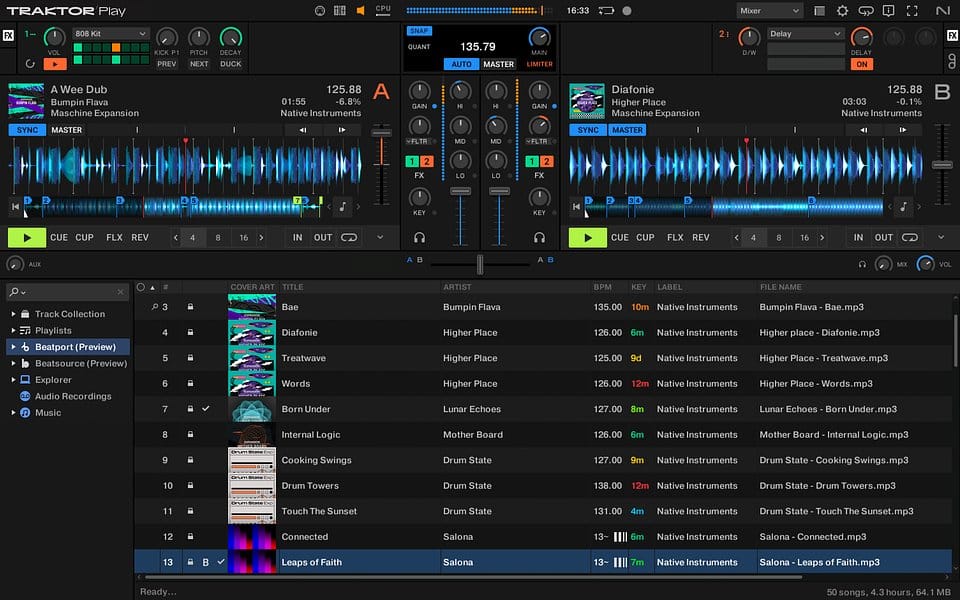
Music access comes through Beatport Streaming, with two free months of Beatport Streaming Advanced for anyone signing up. This is pretty good for beginners to be able to instantly start mixing with streamed songs rather than having to download all their tunes, but compared to some of its competitors, it’s pretty limiting. Serato Lite and rekordbox both offer Apple Music and Spotify support that gives you a lot more flexibility, especially as most people already use one of those services for their daily listening.
Read next: To find out more about all things Traktor, check out our full review of Traktor Pro 4
Compatibility
Traktor Play works perfectly well on its own, but it’s also plug-and-play with several popular controllers:
The FLX units connect instantly, while the Reloop models need a quick setup. It’s not a super extensive list of supported gear, especially compared to some of the other software options out there, but it does cover a couple of the big options. Notably not listed are the Traktor controllers, like the new MX2, which come with the full version included.
This does, however, signal a more open approach from Native Instruments, which used to limit Traktor to its own gear.
Our thoughts
This is the first time in years that Native Instruments has made a true starting point for new DJs. rekordbox, Serato and djay have all focused on offering free, accessible software to pull beginners into their ecosystem.
Traktor Play feels every bit as featured as any of these and, as is Traktor’s general focus, it feels really geared towards more creative performance. The addition of tools like the Pattern Player and simple Stems open up a lot more fun possibilities that you might not expect as a beginner, and things like the key and beat detection are as good as any you’ll find.
Traktor Play is undeniably a great option, but it’s not without a few drawbacks. It costs £44/ $49 / €49, which, while very affordable compared to the full version, still represents a serious barrier to entry. Serato, djay and rekordbox all offer a completely free version that lets you try them out super easily.
If this has inspired you to try DJing for yourself, Crossfader is the perfect place to start. Sign up for free and get three free courses, including our beginner guide to DJing with a laptop, plus a personalised learning plan to keep you progressing.
You can. One of the main selling points of Traktor Play is that it runs perfectly on a laptop with no controller needed. You can learn all the core DJing skills using your keyboard and mouse before moving onto a controller later.
Traktor Play is fully plug-and-play with the AlphaTheta DDJ-FLX2 and DDJ-FLX4, which are both available as official bundles with the software. It also works with the Reloop Buddy and Reloop Ready, which require a quick setup before use.
Traktor Play is a simplified, two-deck version focused on helping beginners learn the basics. Traktor Pro 4 expands to four decks, adds advanced stems, extra effects, and more performance tools for professional use.
At launch, Traktor Play supports Beatport Streaming, which gives you access to millions of club-ready tracks. While that’s more limited than rekordbox or Serato, which now support Apple Music and SoundCloud, it’s ideal for DJs who mainly play electronic music.
Traktor Play costs £44 / $49 / €49 and includes two free months of Beatport Streaming Advanced, giving you instant access to music without needing to buy or download tracks first.
Traktor Play Feature Comparison
| Feature | Traktor Play | Serato DJ Lite | rekordbox Free |
|---|---|---|---|
| Price | £44 | Free | Free |
| Streaming Support | Beatport only | Apple Music, TIDAL, SoundCloud, Beatport, Beatsource | Apple Music, Beatport, SoundCloud, Beatsource |
| Standalone (Laptop Only) | ✔️ | ✔️ | ✔️ |
| Controllers Supported | FLX2, FLX4, Reloop Buddy/Ready | Wide range (Numark, Rane, Roland etc.) | Wide range (Pioneer/AlphaTheta models) |
| Key Detection | ✔️ | ✔️ | ✔️ |
| Creative Tools | Pattern Player, Stems, Mixer FX | FX only (in Lite) | FX and Track Separation |
| Learning Curve | Beginner friendly | Very beginner friendly | Slightly more advanced |
Information correct as of November 2025. Streaming availability may vary by region and device.
Traktor Play vs. Traktor Pro 4
| Feature | Traktor Play | Traktor Pro 4 |
|---|---|---|
| Price | £49 | £129 (£64.50 upgrade) |
| Decks / Channels | 2 decks | 4 decks |
| Streaming Support | Beatport only | Beatport + local and cloud libraries |
| Stems | Basic (mute drums) | Advanced stem control |
| Controllers Supported | FLX2, FLX4, Reloop Buddy/Ready | All NI hardware + some third-party devices |
| Creative Tools | Pattern Player, Mixer FX, basic loops | Full FX suite, advanced looping, automation |
| Recording | Not available | Included |
| Target User | Beginners learning to mix | Intermediate and professional DJs |
Information correct as of November 2025. Feature availability may change with software updates.
I got to test drive Traktor Play today since it was offered for free for FLX-4 owners. It was just very buggy and not all that compatible and “smooth” of an experience compared to Rekordbox. Glad I didn’t have to spend money to discover this. 🙂