
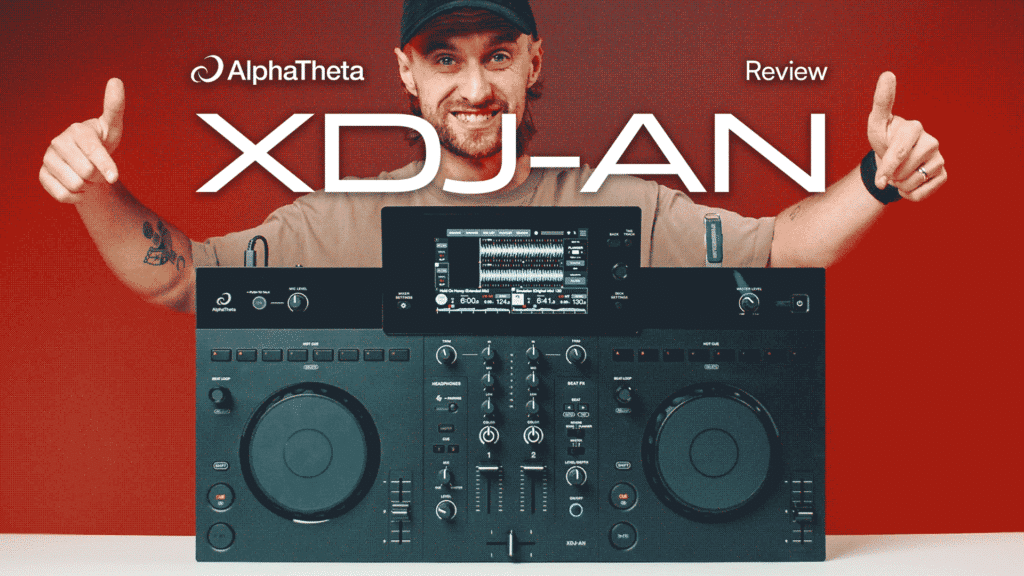
- Price: £999/$1,199/€1,149
- A compact, 2-channel all-in-one standalone DJ system built to replace the XDJ-RR
- Brings a traditional club-style layout and workflow down to an affordable price point
- Delivers a streamlined XDJ experience complete with built-in Wi-Fi, streaming support and basic performance features
For a lot of DJs, the dream setup is to get rid of their laptop and move to an all-in-one standalone for a taste of the proper CDJ-style gear. But these can often end up far more expensive than the classic controller setups. Pioneer have had a budget standalone, the XDJ-RR, in their range for a while now, but after 8 years in which the DJ industry has moved forward, it’s looking increasingly outdated.
So the new XDJ-AN is designed to solve this exact problem. At just £999, it’s now the new cheapest all-in-one in AlphaTheta’s lineup and brings that barrier of entry to this style way down. But of course, at this price point, compromises have had to be made, and there are some areas where you can definitely tell costs have been cut.
So is this new all-in-one worth the investment, or are you betting off just sticking with a controller?
XDJ-AN Video Review
Design and Build
The main thing you’ll notice about the XDJ-AN compared to its bigger brothers in the XDJ range is how much smaller everything is. At 638 x 359.2 x 89.9 mm, it’s all pretty compact and
Everything on these decks is very minimal in its design, with everything being taken back to the bare bones essentials. This is in large part due to a lot of the physical controls that you would have found on other all-in-ones being moved to on-screen controls.
The other thing that makes this look a bit different to all the other all-in-ones is that the performance pads have been moved from under the decks to the classic CDJ position above the decks.
The build quality isn’t exactly as premium as you’d get on their higher end gear like the AZ, but things still feel solid enough. Overall, it sort of looks and feels a lot like the DDJ-GRV6 controller with a screen popped in the middle. That’s by no means a bad thing, though, as we happened to love that controller.
The Decks
The jog wheels themselves are touch-capacitive and noticeably smaller than full-size club platters. There are no built-in visual displays on the wheels, but they handle basic mixing perfectly. They’re a lot like the ones you find on the Omnis Duo, which isn’t a bad thing, but you miss out on things like adjustable resistance compared to high-end models.
The pitch faders are short-throw, which again saves space, but it can make things a bit fiddly and means you’ve got to be more delicate when beatmatching.
Touchscreen and Performance Features
Screen
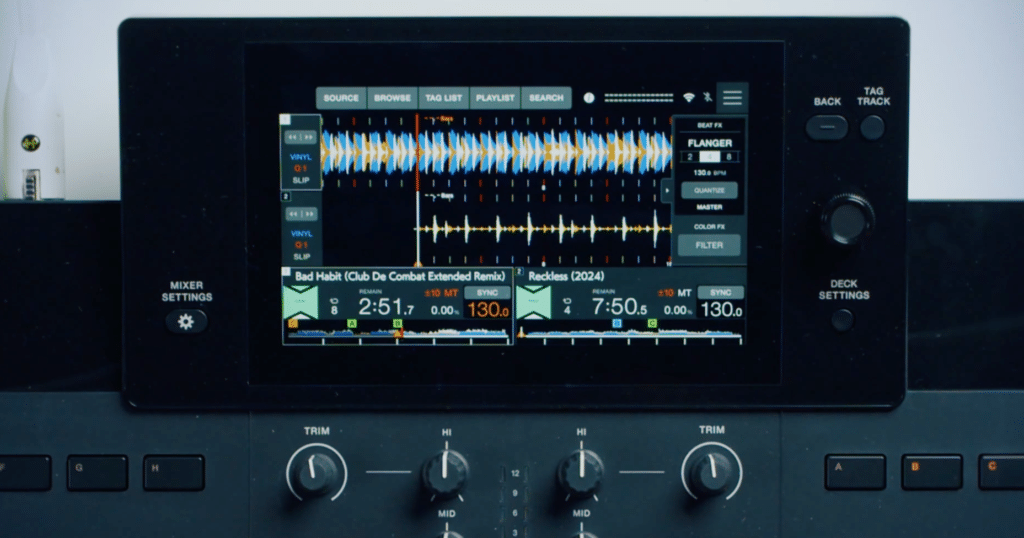
The touchscreen in the middle of the XDJ-AN is bucking the trend AlphaTheta have been making towards large central displays. They don’t officially list the specs on this display, but it’s much smaller than what you’d find on the XDJ-RX3 or AZ, and size-wise, it isn’t a major step up from the RR. That said, the quality looks good, and it’s responsive enough not to be too frustrating.
To keep the unit as streamlined as possible (and no doubt to keep down costs), a lot of the controls that were once physical knobs have been moved to the touchscreen. Things like Vinyl Mode, Quantise, Slip Mode, and Master Tempo are now only controllable on the screen. You also use it to select your Sound Color FX and monitor your Beat Effects fractions. This is following the trend of a lot of recent AlphaTheta gear like the new CDJ-1500X, but unlike on those, the screen here is already pretty compact so forcing more stuff onto it means it quickly starts to feel a bit cramped.
Cues
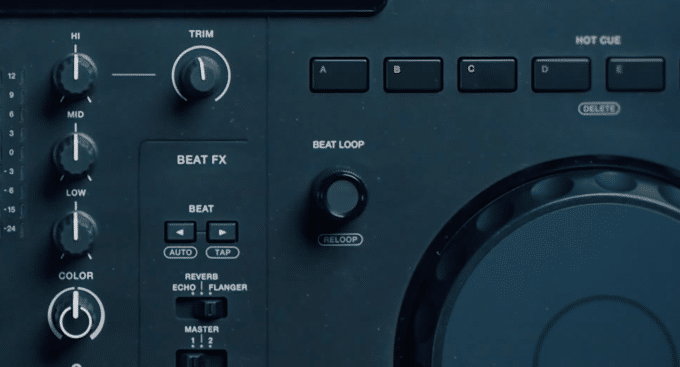
The cue placement on the XDJ-AN is different to any other Pioneer/AlphaTheta all-in-one as they’re now
Having the pads up top instead of below the decks won’t be to everyone’s tastes, however, and it makes it much easier to accidentally nudge the jog wheels when you’re reaching for the pads.
They’re also smaller than the full-size pads you get on a lot of controllers and all-in-ones, so they don’t necessarily have that same tactile feeling. How much this matters to you, though, depends on whether you use them just for hot cues or more elaborate routines.
Looping
Looping has also seen a major design shift. Rather than using traditional physical in and out buttons, loops are now completely driven by a single rotary encoder knob. You simply click the encoder down to catch your loop, and rotate it to shorten or lengthen the phrase.
The Mixer Section
The centre mixer more-or-less follows the classic 2-channel layout that you’d expect, but there’s an interesting design choice that might throw off your muscle memory. The channel trim controls have been placed at the absolute outer edges of the mixer chassis, rather than directly on top of the 3-band EQ strip. Again, it’s probably down to size constraints and isn’t too much of an issue, but it threw us off the first few times we used it.
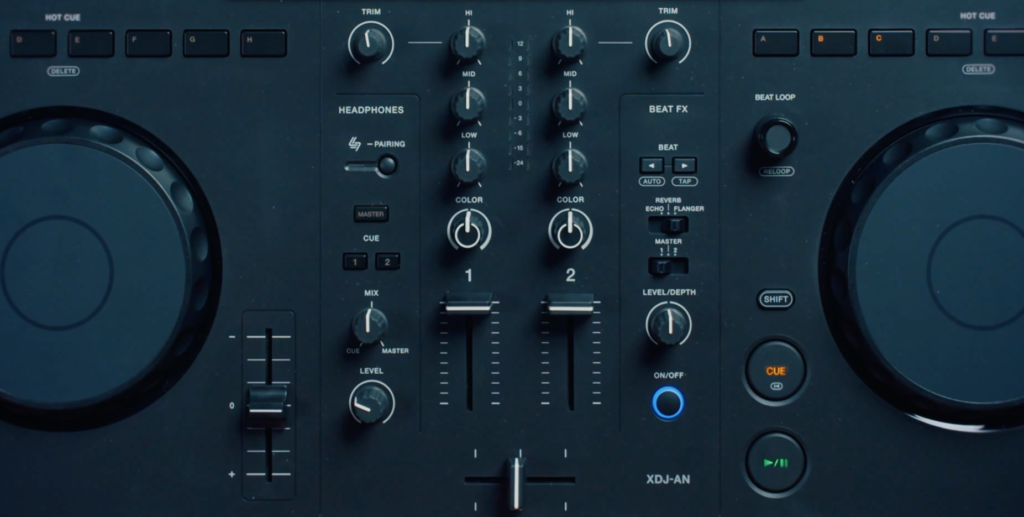
The rest of the mixer works exactly as you would expect. The Sound Color FX section is stripped back to just the knob, which defaults to a classic filter, with alternative options accessible via the screen.
The Beat Effects section is pretty stripped back to just the essentials. Instead of all the effects you’d expect on most mixers, you just get Echo, Reverb and Flanger. This is a bit disappointing not to get some of those more fun effects, especially as they’re all software-based and could have been controlled via the screen like the Sound Color, but a lot of DJs only use these ones anyway.
Music and Connectivity Options
Streaming
One area where the XDJ-AN has taken a big step forward into the modern DJ ecosystem is with its wider range of connectivity options. It’s now got built-in Wi-Fi, so you can stream tracks right on the unit via Apple Music, Tidal, and Beatport Streaming, with Spotify integration coming in a later firmware update.
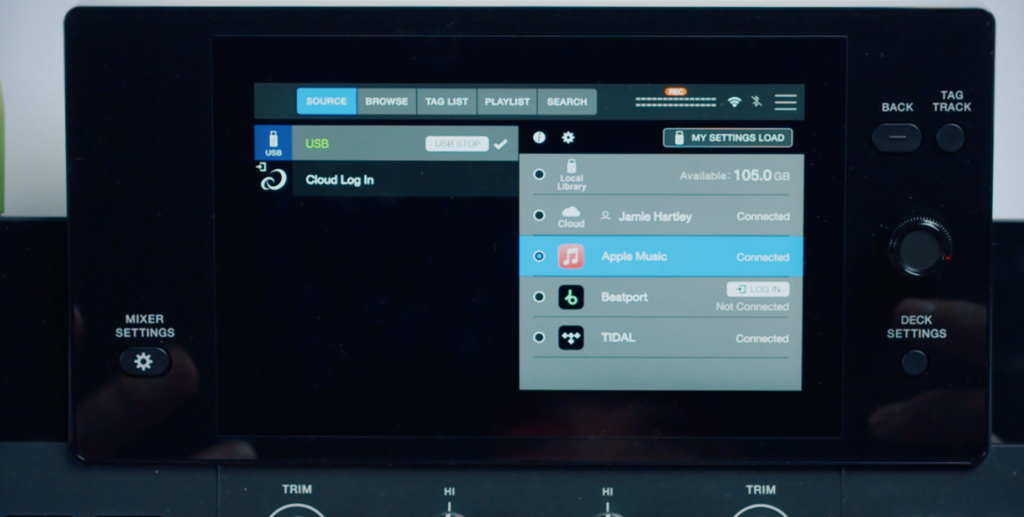
USBs
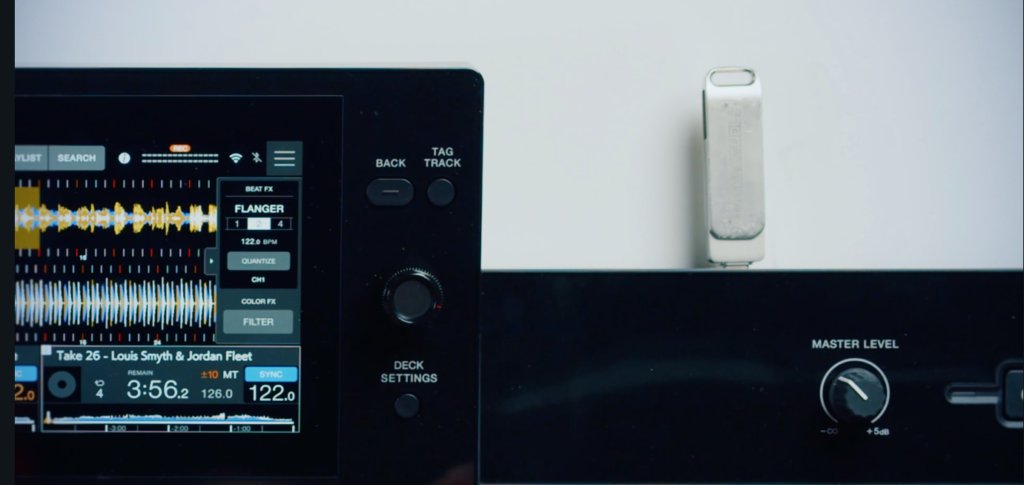
It’s not just the streaming connections that have been changed, though. AlphaTheta have made the bold move to completely remove all the classic USB-A ports and only give you two USB-C ports. While these are becoming increasingly common, they’re still far from universal, and if you have one of these at a party or a venue, don’t be surprised when people rock up with older USBs unable to play their music.
Music Management
Another big upgrade is that you can now manage and update your music library right on the unit without needing to go back to your laptop. Using rekordbox Cloud Library Sync and CloudDirectPlay, you can create new playlists, reorder tracks, or set up fresh hot cues directly on the touchscreen. Any changes you make automatically synchronise with your cloud database, so your laptop’s collection is always up to date.
Software Compatability
The XDJ-AN supports
- Rekordbox for Mac/Windows (Hardware Unlock–no license needed)
- Rekordbox for iOS/Android (USB cable connection is only supported on the iOS version with no license needed)
- Serato DJ Lite (no license needed)
- Serato DJ Pro (subscription needed)
- Algoriddim djay Pro (subscription needed)
- Algoriddimdjay iOS (no license needed)
For extra flexibility, this is the first all-in-one system to offer native support for mobile apps like rekordbox and Algoriddim djay for iOS. That means that even when you’re not connected to Wi-Fi, you can still play from tracks saved on your phone.
The DJM-Rec iOS app is also supported, allowing you to record your mixes on your phone.
Inputs and Outputs
The system is also powered via a USB-C port on the rear panel, with the power coming through an external brick and adapter that comes in the box.
For audio outputs, you get a pro balanced XLR master output alongside standard RCAs, allowing you to plug into home monitors or larger PAs in venues.
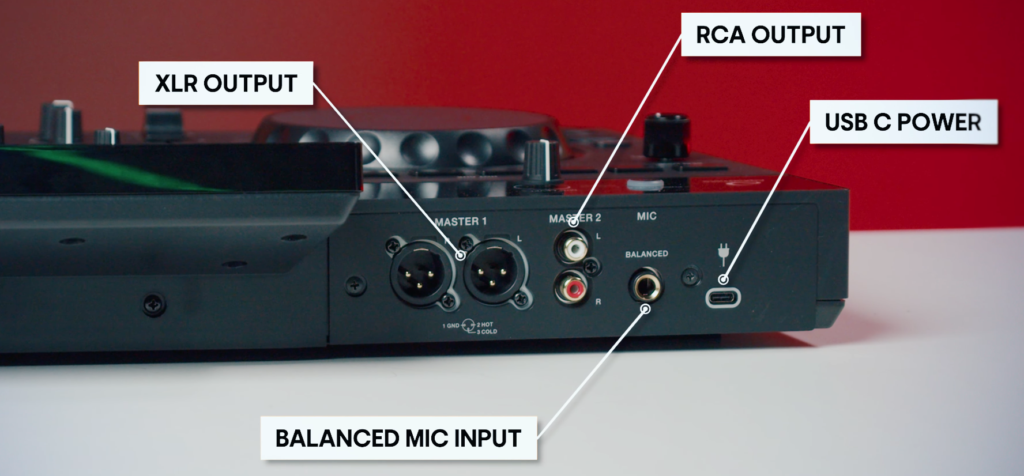
The unit also features a built-in SonicLink wireless transmitter. When paired with compatible wireless headphones like the AlphaTheta HDJ-F10, it connects your audio with a latency of just 9 milliseconds.
Is It Worth It?
The XDJ-AN beautifully fills a gap in the standalone market and brings that barrier of entry way back down. Compared to the XDJ-RR it’s replacing, everything feels far more modern, streamlined and usable with today’s workflows. It’s far from cheap though and it’s a highly competitive market here so you’re within your right to expect certain features that may be missing here.
Of course, at this £999 price point, sacrifices will have to have been made, but unless you’re into particularly complex mixing techniques or really need physical buttons for all your controls, you’re unlikely to really feel like you’re sacrificing all that much capability. That said, things like the lack of USB-A, awkward power brick, mini jogs and limited effects are legitimate concerns for some.
Overall, though we’re very impressed with this new XDJ and it should bring the barrier of erntry for standalone gear way back down for beginner DJs. Especially if you’re into learning the club-style layout before playing in clubs, this could be a great pick for a home or travalling setup.
Learn to DJ on XDJs
If you want to get the most out of gear like this, we’ve got you covered.
Our dedicated XDJ courses will show you exactly how to mix on these standalone controllers, including how to get them set up, manage your music library and get mixing across a range of styles and experience levels.
You can explore these and loads more when you sign up to Crossfader for free where you’ll unlock a personalised learning journey to help you meet your DJ goals.
XDJ-AN vs XDJ-RX3
If you’re shopping for a two-channel standalone rig, your main choices come down to the XDJ-AN or the more premium XDJ-RX3. Overall, the RX3 is a more substantial unit across the board, with a bigger size, more features and a price tag to match. The XDJ-AN cuts down on bulk by ditching performance pads for a club-style hot cue layout above the wheels, keeping the unit at a highly portable 5.2 kg. The RX3 is a much more massive beast at 9.3 kg, sticking to the traditional controller look with large multicolored pads sitting underneath the platters.
The XDJ-AN cleans up the front panel by moving core settings like Quantise and Slip Mode into the touchscreen, while going all-in on modern Wi-Fi streaming and a single USB-C port. The RX3 keeps everything tactile with dedicated physical buttons, dual USB-A slots, and a massive on-board FX engine, alongside proper inputs for external turntables that are completely missing on the streamlined XDJ-AN.
Read the full review of the XDJ-RX3 for more info.
| AlphaTheta XDJ-AN | Pioneer DJ XDJ-RX3 | |
| Weight | 5.2 kg | 9.3 kg |
| Dimensions (WxDxH) | 638 x 359.2 x 89.9 mm | 728.1 x 469.5 x 118.4 mm |
| Hot Cue Layout | Horizontal buttons above wheels | Performance pads below wheels |
| Performance Controls | Shifting into touchscreen menus | Dedicated physical buttons |
| On-Board Effects | 3 Beat FX, Sound Color Filter | 14 Beat FX, 6 Sound Color FX |
| Storage Connections | 1x USB Type-C | 2x USB Type-A |
| External Inputs | 1x Mic (1/4-inch TRS) | 2x Line, 2x Phono, 2x Mic, 1x Aux |
| Wireless / Cloud | Wi-Fi, Cloud Library Sync, SonicLink | None |
| Power Supply | External USB-C adapter brick | Internal AC mains power |
AlphaTheta XDJ-AN: Key Specifications
| Launch Date | 9 July 2026 |
| Price | £999 (€1,149 / $1,099 ex. tax / $1,199 US) |
| Dimensions (W x D x H) | 638 x 359.2 x 89.9 mm |
| Weight | 5.2 kg |
| Compatible Software | rekordbox (Mac/PC/iOS), Serato DJ Lite/Pro, Algoriddim djay Pro |
| Streaming Support | Apple Music, Tidal, Beatport Streaming, Spotify (future update) |
| Audio Terminals | 1x Mic (1/4″ TRS), Master Out (1x XLR, 1x RCA), 1x Phones (3.5mm) |
| Storage Connections | 1x USB Type-C |
| Wireless Technology | Wi-Fi, Bluetooth Classic (SBC/AAC), SonicLink (2.4 GHz) |
| Total Harmonic Distortion | 0.003% (USB) |