

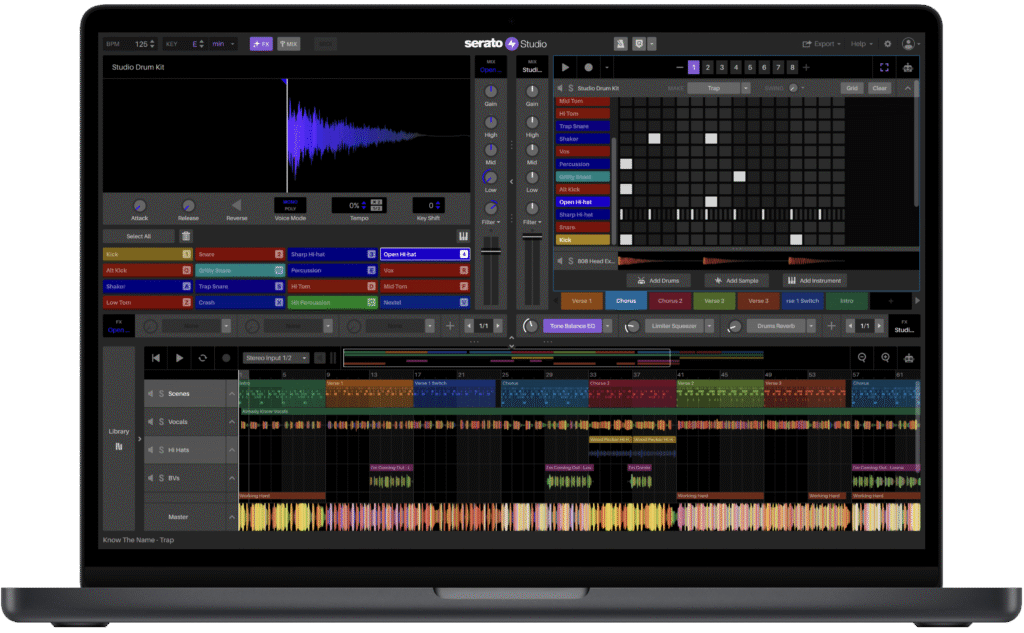
Serato has just announced that Serato Studio is now included as part of Serato DJ Suite, at no extra cost to new and existing DJ Suite users.
That means DJ Suite now brings together Serato DJ Pro, all Serato DJ Expansions, and Serato Studio in one premium bundle. For DJs, this is a pretty big move.
Until now, DJ Suite was mainly focused on performance. It gave you Serato DJ Pro plus the expansions needed for DVS, Pitch ’n Time DJ, Flip, Video, Play and more. With Studio now included, Serato is pushing DJ Suite beyond just playing music and much further into creating, editing and producing it too. Serato’s official DJ Suite pricing page now lists Serato Studio as part of the bundle alongside DJ Pro and the expansions.
You can check the latest plans and pricing directly on Serato DJ Suite.
What has Serato announced?
Serato Studio is now part of DJ Suite, effective immediately for current DJ Suite subscribers and license holders.
The headline news is simple: if you already have Serato DJ Suite, you now get Serato Studio included as part of that package.
For new users, DJ Suite now offers a more complete setup from the start. Instead of only giving you the tools to perform, it now gives you a proper way to create edits, mashups, beats and original ideas before bringing them back into your DJ sets.
That’s important because the line between DJing and producing is getting blurrier all the time. More DJs are making their own edits, adding intros and outros, creating bootlegs, chopping up vocals, using stems and building exclusive versions of tracks for their sets.
This update is clearly designed for that world.
What is included in Serato DJ Suite now?
With the addition of Studio, Serato DJ Suite now includes:
| Tool | What it does |
|---|---|
| Serato DJ Pro | The main professional DJ software |
| Serato DVS | Control Serato with turntables or CDJs |
| Pitch ’n Time DJ | Change tempo while keeping tracks in key |
| Serato Flip | Create edits and cue point-based rearrangements |
| Serato FX | Add extra effects for performance |
| Serato Video | Mix video alongside audio |
| Serato Play | DJ without connected hardware |
| Serato Studio | Make beats, edits, mashups and original tracks |
That makes DJ Suite feel much more like a full creative ecosystem rather than just a DJ software bundle.
What is Serato Studio?
Serato Studio is Serato’s beat-making and production software. It’s designed to be quicker and more approachable than a traditional DAW, especially for DJs who already understand things like BPM, key, cue points, stems and song structure.
Inside Studio, DJs can make custom edits, build drum patterns, work with samples, use instruments, add effects, arrange ideas and create full tracks. Serato describes Studio as a beat maker for sampling, sequencing, virtual instruments and recording.
The big advantage here is that it connects with the way DJs already think.
Rather than opening a traditional DAW and starting from a blank, slightly intimidating project, Studio is built around speed. You can use your Serato DJ library, work with familiar DJ-style tools and turn ideas into something usable much more quickly.
Why this matters for DJs
For DJs, the biggest win is workflow.
A lot of DJs already want to make their own edits, but the process can feel like a bit of a barrier. Opening Ableton, Logic or FL Studio just to extend an intro, clean up an outro or make a quick mashup can feel like overkill if you’re mainly focused on DJing.
Serato Studio makes that process feel much more approachable.
1. You can make tracks more gig-ready
Loads of great tracks aren’t made with DJs in mind. They might have short intros, awkward outros, sudden breakdowns or vocals that make them tricky to mix.
With Studio included in DJ Suite, you can build more DJ-friendly versions of those tracks. That could mean extending the intro, adding drums, cleaning up an outro or creating a version that fits better into your set.
For open-format DJs, mobile DJs and club DJs, that’s genuinely useful.
2. Mashups become easier
Mashups are one of the best ways to make your sets stand out, especially if you’re playing familiar music but want to put your own spin on it.
Studio includes tools like Stems, Key Shifting and BPM Syncing, which should make it easier to take a vocal from one track, place it over another, get everything in time and key, then turn it into a polished edit.
That doesn’t mean every mashup will automatically sound amazing. You still need good taste, musical timing and a proper understanding of energy. But having the tools closer to your DJ library definitely removes some of the friction.
3. DJs can move into production more naturally
Not every DJ wants to become a full-time producer, but a lot of DJs do want to start creating.
That might mean making simple bootlegs, adding drums to a track, building a transition edit or starting an original idea from a loop or sample.
This update gives DJs a much easier entry point. If you already use Serato, Studio now sits much closer to your existing workflow.
Why this matters for producers
For producers, this update is interesting from the other direction.
If you’re already making beats or tracks in Serato Studio, DJ Suite gives you a more direct route into performance. Your ideas don’t have to stay in the production world. They can become edits, live tools, DJ versions or tracks you test in your sets.
It also makes Serato’s ecosystem feel more complete. You can build an idea, shape it into something playable, organise it inside your DJ library, and then perform with it in Serato DJ Pro.
That kind of end-to-end workflow is something more music tech companies are clearly chasing. We’ve seen a lot of movement recently around DJ software, stems, production tools and library integration, and this feels like Serato making a very clear play in that direction.
The key features DJs should care about
Serato has highlighted a few core benefits of bringing Studio into DJ Suite.
Stay in your world
Your Serato DJ essentials, including crates, cue points and hardware support, can carry into Studio. That means less setup and fewer barriers when you want to create something from the music you already use.
Make it gig-ready
You can fine-tune intros, extend outros and make tracks easier to mix. This is probably one of the biggest everyday use cases for working DJs.
Master the mashup
With Stems, Key Shifting and BPM Syncing, you can get ideas moving quickly. This could be ideal for quick bootlegs, transition tools and unique versions of tracks.
Put your own spin on it
Studio also includes a drum sequencer, instruments, FX, automation and soundpacks, giving you enough creative tools to go beyond simple edits and start building more original ideas.
Is this just for producers?
No, and that’s really the point.
Serato Studio has always been a production tool, but this move makes it feel much more like a DJ tool as well. It’s not just about making full tracks from scratch. It’s about giving DJs practical tools that can improve their sets.
You might use it to:
- Add a longer intro to a track
- Make a clean outro for mixing
- Create a mashup
- Build a transition edit
- Add drums under a vocal
- Make a quick bootleg
- Start an original beat
- Prepare unique versions for gigs
That’s where this becomes useful. It’s not just “production software included in a DJ bundle.” It’s a way to make your DJ sets more personal.
The Crossfader take
This is a smart move from Serato.
One of the biggest shifts in DJing right now is that DJs are no longer just playing tracks. More and more, DJs are expected to bring something unique to the booth. That might be edits, mashups, acapella blends, stems routines, custom intros, transition tracks or original productions.
The problem is that creating those extra tools can be a bit of a headache. Traditional DAWs are powerful, but they’re not always built around the way DJs think. Serato Studio is much more immediate, and adding it to DJ Suite makes that creative step feel far more natural.
For existing DJ Suite users, this is a nice win. You’re getting a whole extra creative platform without paying more.
For Serato DJ Pro users who haven’t upgraded to Suite, this makes the bundle a lot more tempting. Before, DJ Suite was mainly about unlocking performance expansions. Now, it also gives you a pathway into production and edit-making.
For beginners, we’d still say don’t get distracted by trying to do everything at once. Learn the fundamentals first. Beatmatching, phrasing, EQ, track selection and clean mixing still matter more than any software bundle. But once those basics are in place, Studio could be a great way to start making your sets sound more like you.
That’s exactly the kind of thing we focus on at Crossfader: helping DJs understand not just which tools to use, but how to use them properly in real sets. Crossfader’s course page covers structured DJ training across software and equipment, including Serato DJ.
Should you try Serato Studio in DJ Suite?
If you already have DJ Suite, yes. There’s no real downside to opening it up and seeing how it fits into your workflow.
Start simple. Don’t try to make a full track straight away. Try making a basic intro edit, extending an outro or creating a quick mashup with two tracks you already know well.
That’s where you’ll probably feel the benefit fastest.
If you’re currently using Serato DJ Pro without Suite, this update makes DJ Suite much more interesting. The value now depends on whether you want the extra performance tools and whether you can see yourself using Studio for edits, mashups or production.
If you’re a producer who’s been curious about DJing, this also makes Serato’s ecosystem even more appealing. Studio can be your creative starting point, while DJ Pro gives you a route to perform what you make.
Quick FAQ
Is Serato Studio now included in DJ Suite?
Yes. Serato Studio is now included as part of Serato DJ Suite at no extra cost to new and existing DJ Suite users.
Is Serato Studio free for all Serato users?
No. The announcement applies to Serato DJ Suite users. Serato Studio also has its own pricing options separately, but this update means DJ Suite now includes Studio.
What does Serato DJ Suite include?
Serato DJ Suite includes Serato DJ Pro, all Serato DJ Expansions, and now Serato Studio. That covers tools such as DVS, Pitch ’n Time DJ, Flip, FX, Video, Play and Studio.
Can DJs make edits in Serato Studio?
Yes. Serato Studio can be used to create custom edits, extend intros and outros, make mashups, add drums, use stems and build original track ideas.
Does Serato Studio work with Serato DJ libraries?
Serato says Studio supports key Serato DJ essentials including crates, cue points and hardware support, helping DJs move between DJing and production more smoothly.
Is Serato Studio good for beginners?
It can be a good starting point for DJs who want to try production or make edits, because it is designed to be quicker and more approachable than a traditional DAW.
Where can I learn to DJ with Serato?
You can build your Serato DJ skills with Crossfader’s online DJ courses, covering core DJ techniques, software workflows and creative performance skills.