
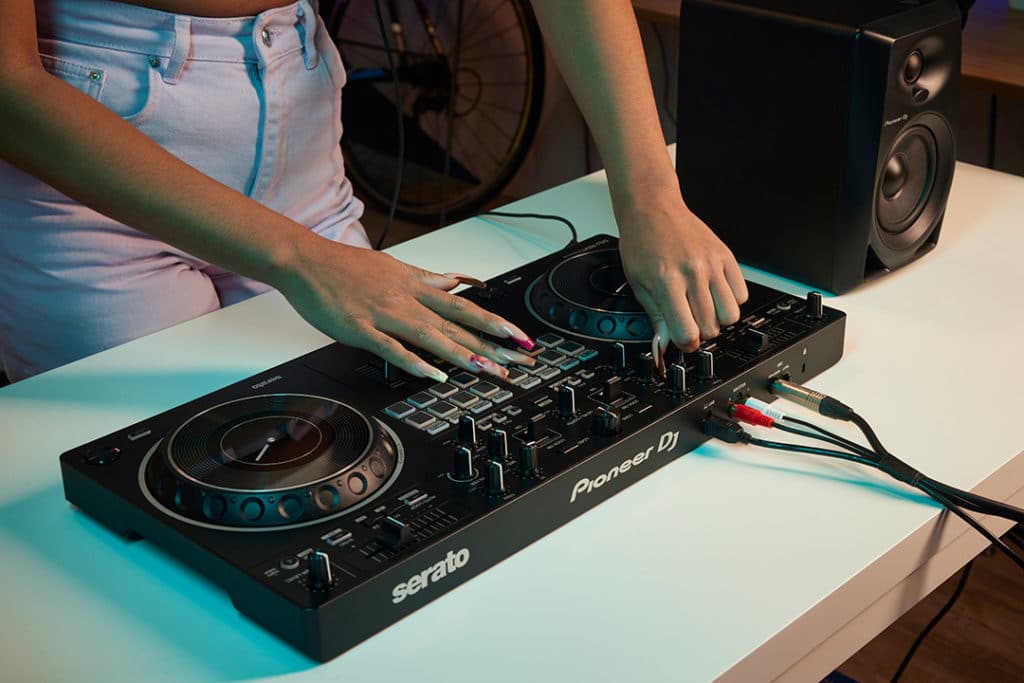
Getting your hands on a shiny new piece of DJ kit is always exciting. But choosing the right gear to invest in can mean lots of research.
That’s why we’ve put together our ultimate guide to finding the right DJ device for you, on any budget!
Whether you are a beginner DJ looking to get your first controller or a professional wanting to level up your existing rig, we’re here to help!
In this 2025 guide, we walk you through the hottest gear, with something for everyone, whether you’re sticking to a budget or looking to invest in a premium rig.
We’ve included some of our favourite DJ equipment from recent years. All road-tested by our team of pro DJs to bring you an unbiased opinion on the best gear in the industry today.
Let’s go!

Article Guide
- Which Type Of Device Should I Go For?
- Best Beginner Controllers
- Best Intermediate Controllers
- Best Flagship Controllers
- Best Low-Cost All-In-Ones
- Best Mid-Range All-In-Ones
- Best Flagship All-In-Ones
- Turntables and a Battle Mixer
- Media Players and a Club Mixer
- Flagship Club Standard Rig
- Not Sure Which Device is Right for You?
Equipment Overview
We’ve sorted all the kit into three categories that all DJ gear falls into. Controllers, All-in-ones and Standalone/ modular equipment.
In this guide, we review our top picks for each type of device.
We explore options for beginner DJs looking for their first set of decks, to those upgrading to a more intermediate rig, right through to the no-expenses spared premium picks.
We look at a broad selection of equipment that will appeal to most DJs, so it should serve as a solid guide to the best options for any DJ.
Which type of DJ device should I use?
Below is a breakdown of the main features of each type of device and who they are best suited to:
- Controllers – These are the most popular devices for beginners and also the least expensive. They are comprised of two deck sections with a mixer in the middle and must be used with a laptop running DJ software.
- All-In-Ones – These devices cost more than controllers, so are typically suited to intermediate DJs and professionals. They are super convenient and just as easy to transport, but don’t require a laptop. They have built-in screens running performance software, so all you need is music from a USB stick, SD card or streamed in via a subscription service.
- Standalone or Modular Equipment – For DJs wanting flexibility with their set-up, buying the decks and mixer separately means a rig can be personalised. This is ideal for professionals who want to customise their setups to meet specific needs. You’ll find open-format and techno DJs putting their insane set-ups together this way. This is also the most expensive way to build a DJ rig.
Controllers
Controllers continue to be the most popular choice for new DJs, and for good reason! They’re budget-friendly and are by far the most portable bits of kit on the market.
All controllers here are designed to work with either Rekordbox or Serato DJ, as these are the industry’s biggest players.
However, most will also work with alternative software like VirtualDJ, Traktor and Algoriddim Djay with a little MIDI-mapping.
Check out our article on MIDI-mapping Algoriddim Djay for more on this.
Best beginner controllers (under £300)
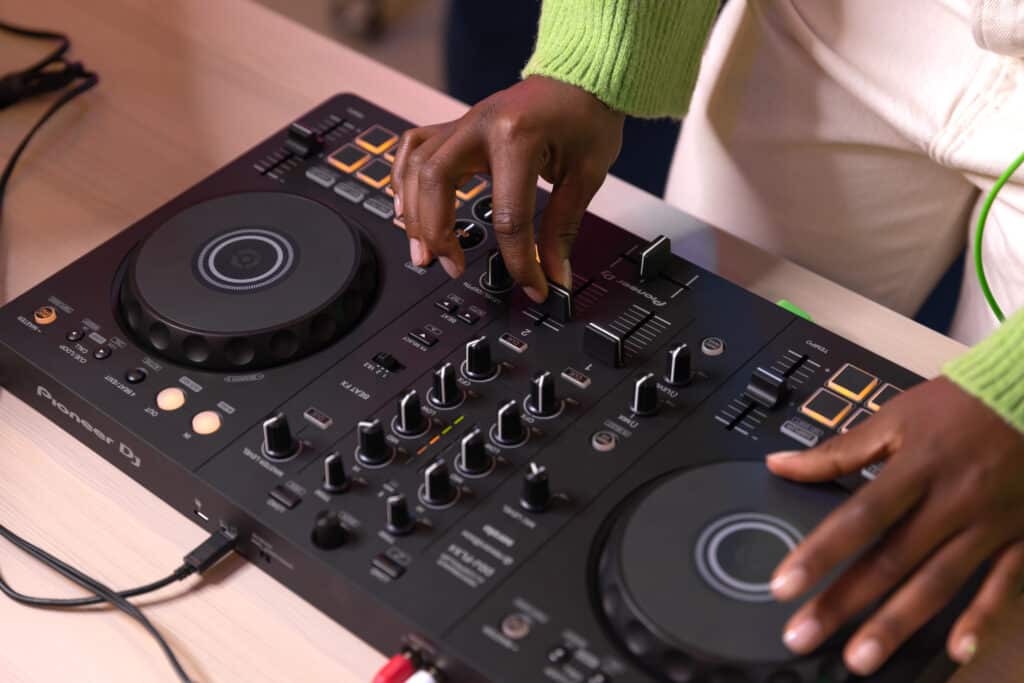
Pioneer DJ DDJ-FLX4 (£279)
For DJs of any level wanting to get used to Pioneer club gear, this is the one. It features everything you need to pull off insane-sounding mixes and then some!
It boasts a slick, lightweight frame with two CDJ-esque decks and a DJM club-style two-channel mixer with beat and colour effects.
Although this controller is targeted at beginners, 95% of what DJs can do on professional rigs is achievable with this. However, it may take a little diving into Rekordbox’s settings to tweak things! For more on this, see our article on Getting Started With FLX4
Watch the video below and learn some impressive DJ techniques for beginners on the FLX4!
FLX4 lends a big helping hand to new DJs with smart mixing and effect settings, allowing DJs to pull off polished transitions within minutes of first touching the decks!
Pros:
- Club standard layout means progressing onto professional Pioneer kit is easy;
- Rekordbox and Serato support means you can use both platforms;
- Smart FX and mixing features are useful for creating unique-sounding mixes and transitions
Cons:
- Small tempo adjust fader can make learning to manually beat match difficult;
- Serato feels a little messy, and not all features work as well as they do in Rekordbox.
If you want to grow your confidence in DJing with FLX4 and learn to use it to its full potential, check out our dedicated Beginner and Pro courses.
7 hours 41 lessons Beginner
Pioneer DJ DDJ-FLX4 Course
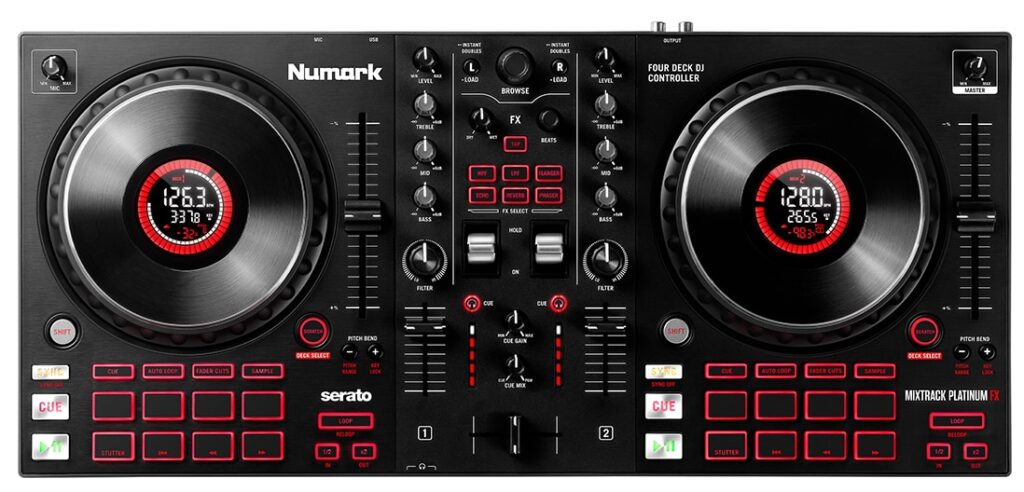
Numark Mixtrack Platinum FX (£239)
Aimed at Serato and open-format DJs, Numark’s Mixtrack Platinum FX is an ideal choice for DJs interested in scratching.
It features full-sized tempo adjust faders for on-point beat matching, a crucial hip-hop mixing skill! For more on beatmatching for beginners, follow the link here
The battle-style paddle effects are great for heat-of-the-moment FX activations. The device supports 4 deck layers and has super useful mini displays inside the jog wheels to help you see what deck you’re controlling.
At this price point, there’s not much else offering these features, as you’d typically have to spend a lot more to get a four-deck device with paddle effects!
Pros:
- Paddle effects have six buttons for quick access to popular Serato effects.
- Full-size tempo adjust sliders are fantastic in this price category.
- In-jog displays are convenient for quickly seeing track and deck data without the need to glance at a laptop screen.
Cons:
- Older style USB-B connector is tricky for plugging into newer USB-C computers.
- Jog wheels are a little on the loose side, which may not suit every DJ’s taste .
Best intermediate controllers (under £1,000)
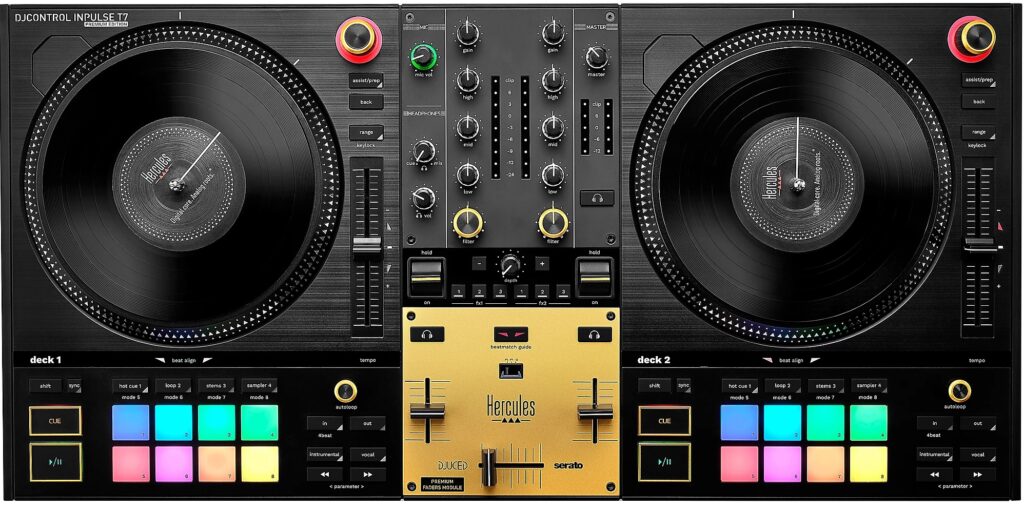
Hercules T7 Premium (£699)
The only device that does spinning platters for well under £1,000!
T7 is the best choice for DJs wanting the analogue feel of vinyl on a tight budget. Its closest-priced competition is the RANE ONE, which costs almost double at £1,300!
Even though T7 is technically not in the same league as RANE’s ground-breaking device due to its lack of direct-drive motors, this unit is still a dream to cut on.
The belt-driven motors, also found on portabilist turntables, are more than powerful enough to scratch on as they only deal with smaller 7” vinyl discs.
We love T7’s battle-style mixer and awesome build. Plus, with the 2024 ‘Premium’ T7 revision, high-quality faders are preinstalled for super sharp cuts.
Watch us cut it up on the original T7 in our performance video!
Pros:
- Build and design feel very solid.
- Belt-driven spinning platters work well to give DJs a true vinyl experience.
- Retractable feet lift the unit to the same height as a traditional turntable for an authentic feel.
Cons:
- Doesn’t ship with Serato DJ Pro, this must be subscribed to separately.

Pioneer DJ DDJ-REV5 (£939)
REV5 is a champion for open-format intermediates and pro DJs, belonging to a family of DJ gear that revolutionised battle controllers forever!
It’s the perfect collaboration between the ultra-premium REV7 and the entry-level REV1, being budget-friendly like 1 but with most of the flagship features from 7.
The only missing key feature is its lack of motorised platters, but this device is great value for DJs wanting to stick to a budget.
REV5 is all a DJ needs to put together some insane routines, with a DJM-S style battle mixer and excellent tactile jogs, which include tension adjustment and cue point displays in their centre for higher accuracy cutting.
It has some unique mixing features, such as the world-exclusive Auto BPM feature, which automates a gradual beat match between two different tempos. With the tempo-adjusting taken care of for you, hands are freed up to get busy scratching and cutting.
Pros:
- Great feeling jogs with adjustable tension to suit any DJ style.
- Excellent cutting faders.
- Tempo adjust faders are in true battle position, so turntablists feel right at home.
Cons:
- Lack of hardware effects, no crossfader tension adjustment.
If you’re interested in scratching, DJing battle style or want to level up your open format skills, check out our Complete Online Scratching Course and Hip Hop Mixing DJ Course!
4.75 hours 42 lessons Beginner
Hip Hop Mixing DJ Course
Best Flagship Controllers (under £1,500)
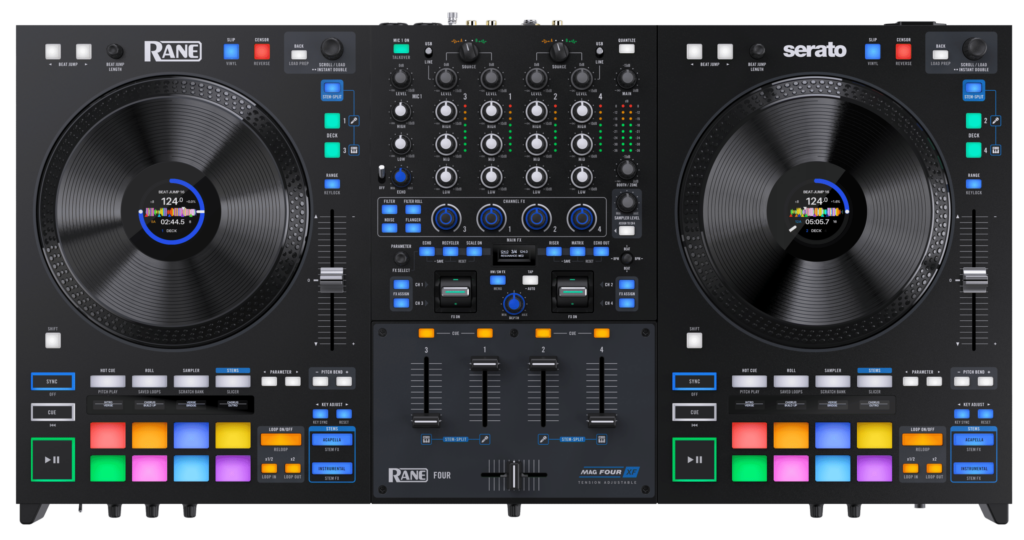
RANE FOUR (£1,399)
This was Serato’s official Stems hardware partner, introducing us to the power of their awesome audio separation feature, which has changed the DJ landscape for good!
RANE FOUR is the ultimate controller for remix DJs working with Stems.
With a solid construction, it remains the gold standard device for controlling Serato Stems.
It also rivals Pioneer’s famous Beat FX with 22 unique built-in effects. All are fully tweakable with parameter controls and sound super clean!
For lovers of Serato, this is the best four-channel controller, and that also goes for open-format DJs who usually mix with just two channels.
Splitting vocals and instrumentals across two channels quickly becomes a second-nature mixing perk on this kit.
Not much can rival the RANE FOUR for remixing on the fly using Serato!
Check out our exclusive RANE FOUR Stems mashup performance mix!
Pros:
- Super clean design; Easy access to stems technology.
- Stems split feature makes the device perfect for remixing music on the fly.
- 22 awesome hardware effects.
Cons:
- Stems split can’t be remapped to go to your channel of choice.
- No tension adjustment for the jog wheels.

Pioneer DJ DDJ-FLX10 (£1,499)
For those wanting to emulate a professional CDJ rig, FLX10 is the closest you’ll get with any controller!
It does stems brilliantly, controls DMX lighting, and has most of the club standard DJM sound colour and beat effects.
It also includes RGB jog-wheel lighting to help DJs visually see which stem they have active. Very useful since controlling four decks of stems can get confusing without visual cues!
On-the-fly remixing is levelled up with this ‘does it all’ super controller.
FLX10’s dual integration with Serato is the most seamless Pioneer has ever created.
Its mapping for Serato is 99% on point with regard to the markings on the top plate of the unit.
We highly recommend this capable controller to club DJs who want to be able to use both Rekordbox and Serato.
Pros:
- Amazing flexibility, allowing DJs to tweak almost every setting to suit their needs.
- Works well with both Rekordbox and Serato.
- Great stems integration.
Cons:
- Layout is a bit cramped with loads of features.
All-in-ones
All-in-ones have grown in popularity in recent years, with battery-powered options making them perfect for DJing anywhere.
You don’t need a performance laptop as they have built-in screens that run DJ software. This means the starting cost of these devices is higher than controllers which do require a laptop.
Rigs range from two-channel options with modest features to full-scale club setup replications at a fraction of the cost of a standalone club rig.
Currently, only two operating systems can run on all-in-ones, Rekordbox and EngineDJ.
Best low-cost all-in-ones (Under £1,100)
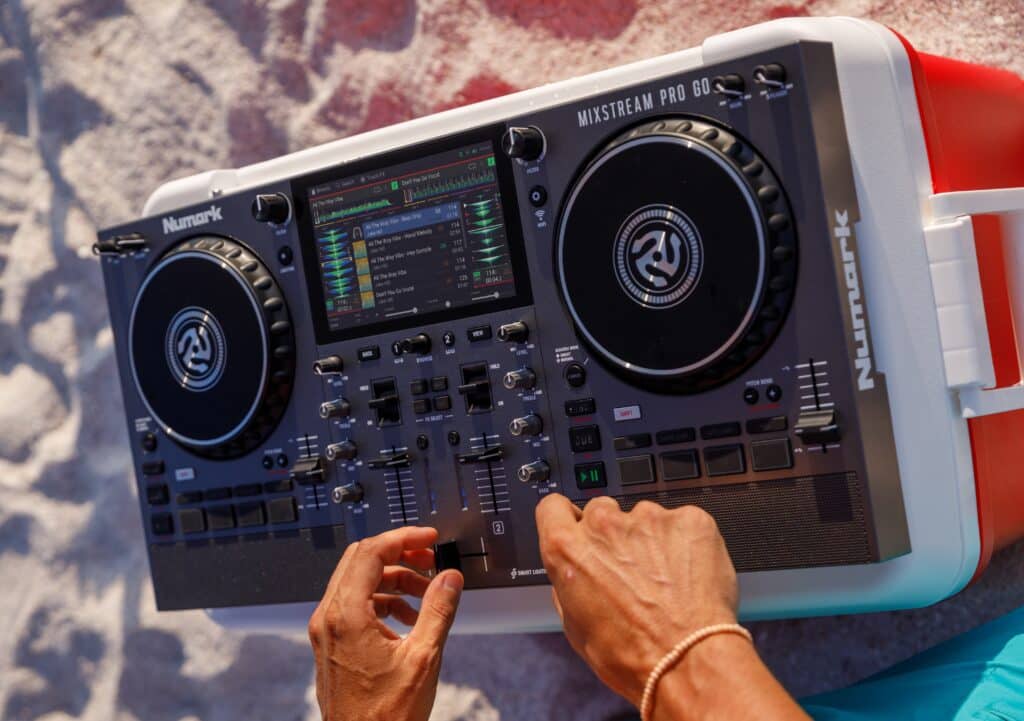
Numark Mixstream Pro Go (£699)
This unit is perfect for any DJ wanting a does-it-all device on a budget.
It has everything you need to DJ, including speakers, access to music streaming partners and performance software, all for an unrivalled cost!
As it runs Engine DJ software, this compact, battery-powered all-in-one packs some serious features despite its more minimal design.
Hidden within the fluid 7” high-definition multi-touch screen are loads of cool functions, such as an XY pad for touch effects.
Battery power and its built-in speaker means it can be taken on the road and is wire-free, with no need to connect to anything other than music sources for practice sessions, whether they be in a bedroom or outdoors!
See what the Pro Go can do with our quick performance mix!
Pros:
- Loads of features packed into a small unit.
- Excellent screen with great viewing angles.
Cons:
- Only four performance pads make accessing some features a bit fiddly.
- Tempo adjustment faders are on the small side, which could be a problem for manual beat matching.

Pioneer DJ XDJ-RR (£1,029)
Pioneer are known for throwing loads of features into their gear, but XDJ-RR is different.
It has all you need to put together a great set with some nice transitions but not much more.
Everything from the jog wheels and tempo adjustment faders to how effects are chosen and assigned to a channel has been streamlined, making the RR a stripped-back Pioneer experience.
Even though RR’s hardware is minimal to meet a price point, the sound quality is excellent, and the unit’s been around long enough to prove its durability.
We recommend the RR to DJs who want to DJ on Pioneer gear but prefer to keep things simple, doing away with extra bells and whistles.
This is also the cheapest option for DJs wanting to play on Rekordbox equipment with USB sticks!
Pros:
- Crisp, clean sound.
- Pioneer layout means DJs can transition to club gear easily.
- Small, lightweight frame makes for easy transportation.
- USB master record allows easy recording of sets to a USB stick.
Cons:
- No Booth output for monitoring mixes in a professional venue.
- Limited number of effects.
- Effects are assigned with a toggle switch rather than the rotary encoders found on other Pioneer gear.
Best Mid-Range All-In-Ones (Under £1,800)

Denon DJ SC Live 4 (£1,129)
This device is tailor-made for live-streaming professionals. A four-deck all-in-one at this price point is a big deal!
The only gripe is that the 7” high-resolution multi-touch screen might seem small when using all four decks in the mix, but we’ve found it to be perfectly workable.
The built-in speaker has a good punch and works well as a booth monitor in quieter environments. Unlike Denon DJ’s flagship, PRIME 4, SC LIVE 4 imitates the club standard layout of CDJs and a DJM mixer, so is a win-win for those wanting to progress onto standalone club kit later on.
It is also worth noting that EngineDJ software can natively control light shows and integrates seamlessly with SoundSwitch for more professional and intricate displays.
SC LIVE 4 has a LIGHTING button to immediately access the in-depth dedicated lighting software.
For the price, this is completely unrivalled!
It is feature-rich and looks decent in a live-streaming studio while happily catering to mobile DJs with its plentiful and professional I/O.
These include XLR outs and the option to plug in a second mic or auxiliary device like a smartphone. The ultimate value device for mobile DJs!
Watch us put all four decks in the mix with the SC Live 4!
Pros:
- Four deck all-in-one mixing at the lowest possible price.
- Engine DJ software updates add useful features.
- Club-standard layout so DJs can progress to working on club equipment.
Cons:
- The screen can be a bit busy when mixing with four decks.
- Build quality feels a little flimsy.
EngineDJ OS is a powerful performance software worth mastering. It has plenty of exclusive features and offers a fantastic alternative to Rekordbox.
Our Denon DJ courses cover everything Engine DJ so you can be confident to step behind any Engine device and deliver your DJ sets with confidence!
6.5 hours 36 lessons Beginner
Denon DJ Prime Course
5 hours 40 lessons Intermediate
Denon DJ Prime Course
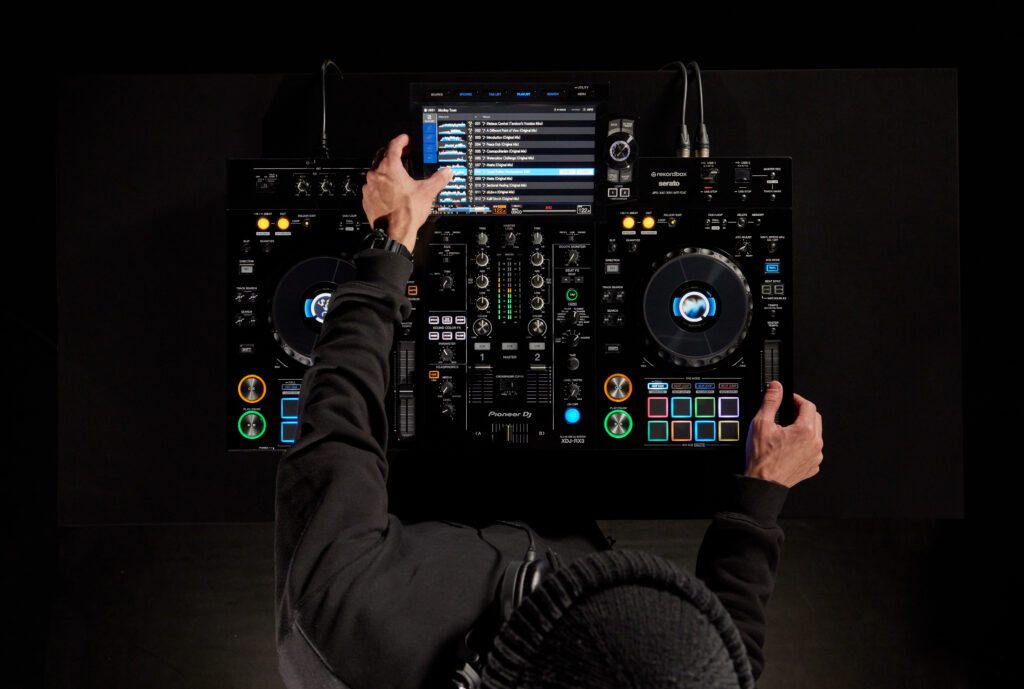
Pioneer DJ XDJ-RX3 (£1,699)
RX3 is perfect for club DJs who want a compact device that travels easily or looks the part in a studio or home environment.
This device’s gorgeous 10.1” touchscreen jumps out at you and is the main feature of RX3!
With an OS based on Rekordbox 6, the interface looks similar to the current club standard of the CDJ-3000.
It beautifully displays three-band EQ waveforms and seamlessly navigates through utility and performance menus.
The mixing hardware is comprehensive, too, with the same beat and colour effects as the DJM-900NXS2.
The knobs, buttons and faders are really well-spaced out.
The performance pad modes include Gated Cue and Release FX, so the device is on par with flagship controllers for functionality.
The central jog wheel screens are reminiscent of those found in the CDJ-3000s, an excellent choice for DJs used to a 3000 rig.
Pros:
- Brilliant screen and hardware combination.
- Jog wheels feel great and have tension adjust.
- The unit is lightweight and travels easily.
Cons:
- No effects frequency select as found on the DJM-900NXS2.
- Software updates don’t include touchscreen features found in newer hardware.
Our XDJ course is built from the ground up around mixing on Pioneer’s awesome all-in-one and standalone devices. Learn how to optimise your music collection for use with their super-capable hardware and give your DJ sets the polish Pioneer gear is famous for!
8.5 hours 47 lessons Beginner
Pioneer XDJ DJ Course
Best Flagship all-in-ones (Under £3,000)
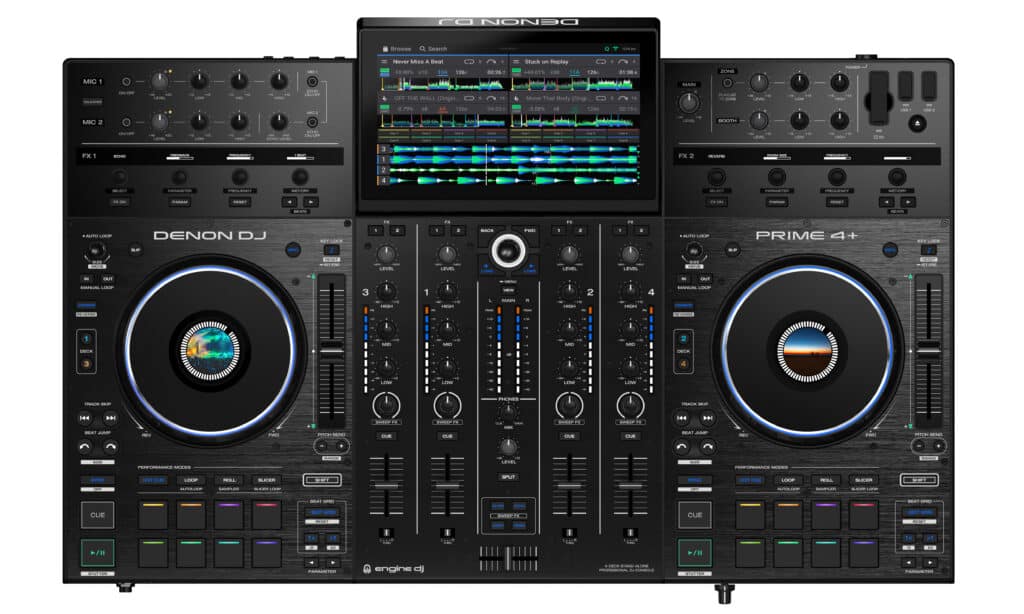
Denon DJ PRIME 4+ (£1,979)
PRIME 4 and 4+ are the mobile DJ’s ultimate tools, offering more useful features than any other all-in-one on the market!
PRIME 4 was the world’s first all-in-one to offer four-deck mixing and remained so for years!
It’s still ahead of its time, but that hasn’t stopped Denon DJ from giving it a refresh to bring its look in line with newer gear.
The 4+ is a nice revision, bringing the PRIME 4 up to date with a paint respray and performance enhancements such as better jogs and the ability to connect to Amazon Music.
Plus, it offers the world-exclusive ability to separate stems in real time!
PRIME 4+ offers the most options for music playback and audio routing.
There are no real alternatives for DJs wanting comprehensive audio setups with control over different music zones and many music source options.
We love the under-unit SATA bay for permanently storing up to 4TB of local music files so your core music collection is always on hand.
This was also the first device to have a Zone output to play an alternative playlist into a second room whilst the main room gets the live DJ set!
Pros:
- Superfluid, high resolution 10” touch screen.
- Effects are super tweakable with plenty of parameter controls; Zone audio output to send a music playlist a second room.
- SATA bay to permanently store up to 4TB of local music files.
Cons:
- Does not have the traditional club layout.
- screen pokes out when laid flat, making travelling with it a little awkward.
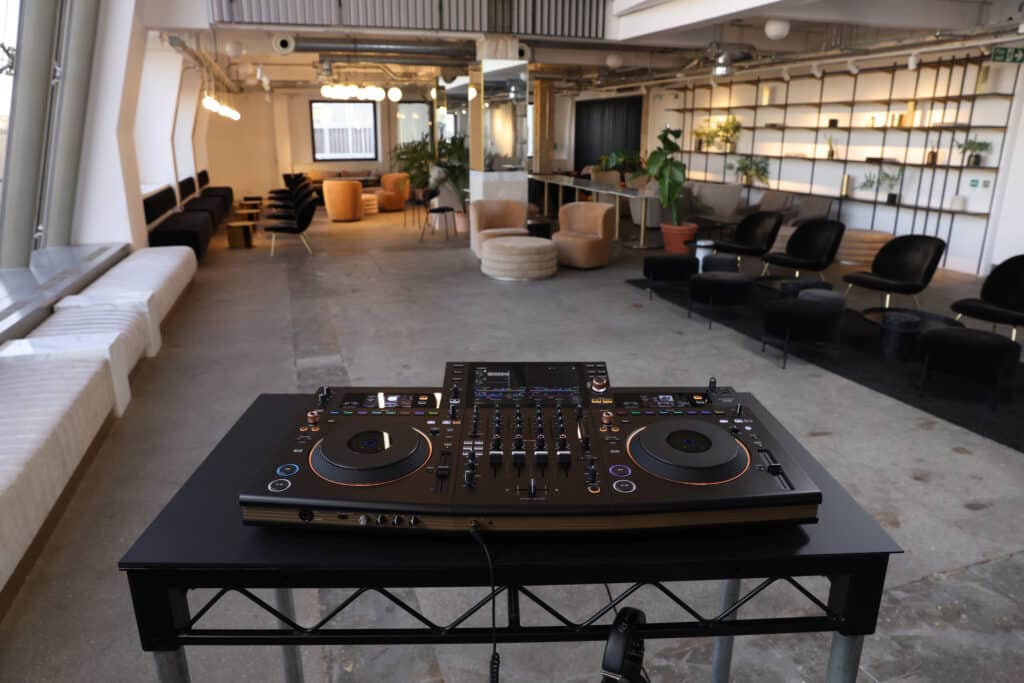
Pioneer DJ OPUS-QUAD (£2,899)
If you like the idea of an elegant-looking console, look no further than Pioneer’s striking OPUS-QUAD.
OPUS was supposed to be the sequel to Pioneer’s super popular flagship four-channel all-in-one, XDJ-XZ, but ended up being the launch product for a whole new line of ultra-premium gear from Pioneer.
It is both their first piece of kit to play four all-in-one decks and to adopt a fully minimal and timeless look.
It is as feature-rich as it is good-looking. With RGB jog wheel lighting to indicate which layer of a deck is in play and small screens above each deck to display track data and artwork.
It also brings much-needed updated features over the XZ, such as the Zone output, which debuted on PRIME 4, Bluetooth connectivity to quickly take a song request and built-in Wi-Fi for cloud connecting to music.
Perfect for DJs who want a beautifully designed, ergonomic console with modern connectivity like Wi-Fi and Bluetooth.
We put OPUS through its paces with our performance mix!
Pros:
- Four-deck mixing with features tucked away into the software.
- Beautiful and highly functional 10.1” multi-touch high-resolution screen.
- Striking minimal design with an ergonomic sloped angle.
- RGB Coloured jog wheel rings indicate which deck is in play.
Cons:
- No Slip mode.
- No performance pads.
- Lack of hardware buttons means OPUS is a little ‘form over function’
Standalone/ Modular Equipment
This takes us back to the old-school way of DJing, as the only way to build a rig back in the day was to buy the decks and mixer separately.
Putting equipment together yourself is still rewarding for DJs today and allows a DJ’s rig to evolve to suit their needs over time. But the cost can wrack up fast!
We’ve put together three proven rig configurations, popular amongst DJs of varying budgets and needs.
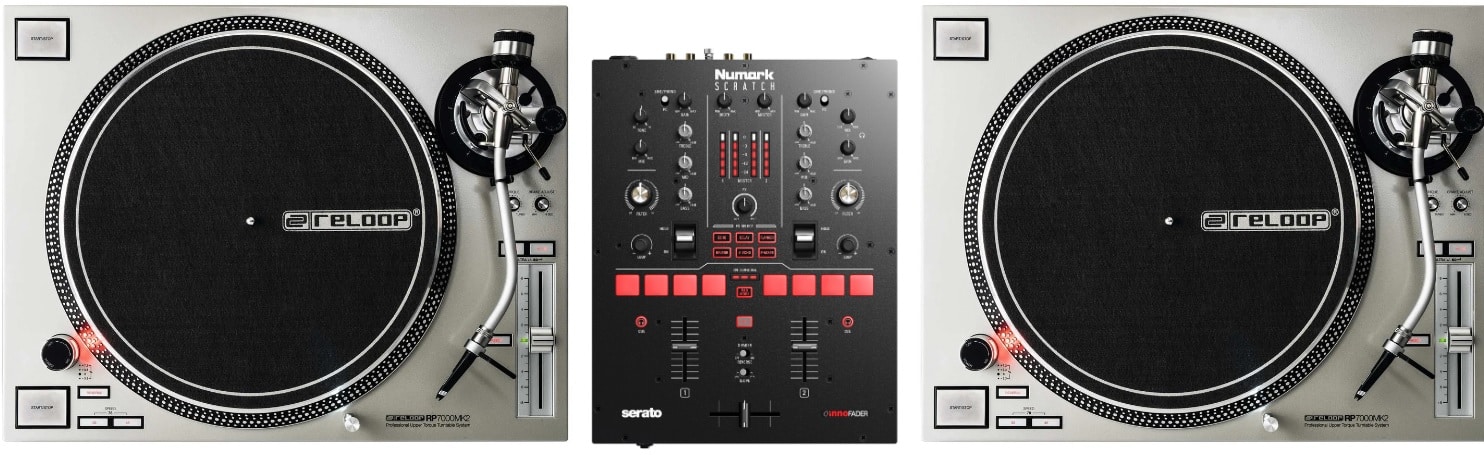
Turntables and a battle mixer (from £1,409)
Reloop RP 7000MK2 turntable (£475 x2) / Numark Scratch battle mixer (£459), totalling £1,409
Spinning on the wheels of steel can be addictive!
Most DJs who have done it stick to it in some form while enjoying the digital era’s benefits with Serato DJ Pro rather than analogue vinyl.
This rig is perfect for DJs who want to mix and cut with turntables and a mixer ready for battle.
It consists of two, high-torque turntables with an insane amount of pitch to adjust the tempo of tracks (+/- 50%).
Perfect for those looking to scratch, beat-juggle, put together routines with crazy BPM jumps or perform tone play tricks.
Whilst the mixer is basic, it unlocks Serato DJ Pro and caters to scratch DJs with a mini innoFADER built in. The go-to crossfader for sharp cuts!
The performance pads are limited to four per channel, but with no complaints at this price point.
Its I/O is comprehensive, easily plugging into professional speakers via XLR or a domestic or studio environment via RCA.
Pros:
- Serato DJ Pro licence included, no need to pay for a monthly subscription.
- Turntables have Ultra Pitch, making tone play and big BPM jumps easy to perform.
Cons:
- No additional inserts on the mixer to plug turntables or media players in at the same time.
- Lack of a professional Booth output for monitoring mixes on the mixer.
- No hardware effects on the mixer.
The beauty of this setup is that any part of it can be upgraded. Our top picks for switching out the Reloops are the Technics 1200 MK7 turntable (£895 x 2) or the Pioneer DJ PLX-CRSS12 hybrid turntable (£1,199 x 2).
To swap out the Numark battle mixer, we recommend the Pioneer DJ DJM-S5 battle mixer (£749), or RANE SEVENTY (£1,199).
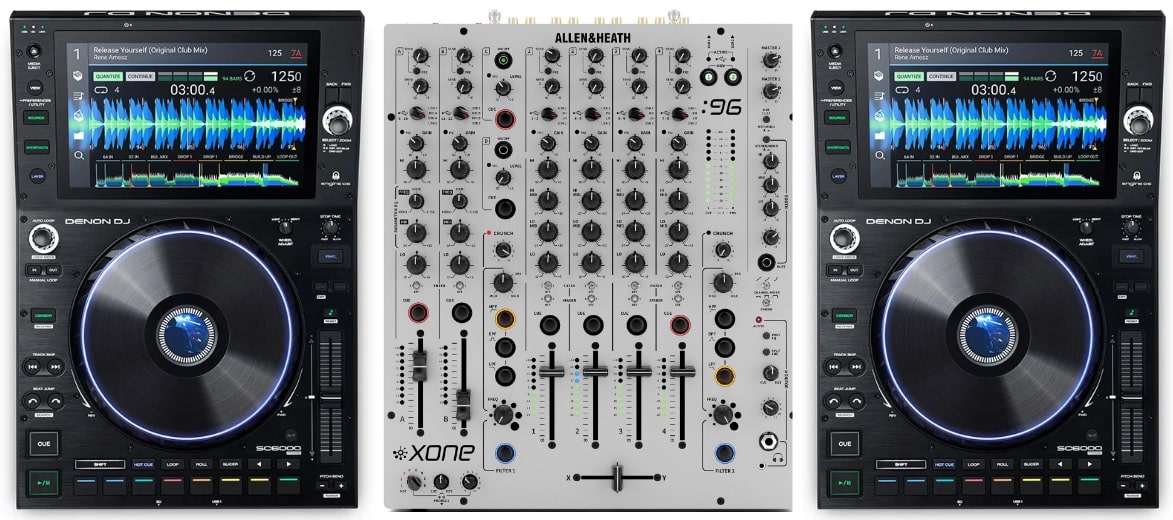
Media players and a club mixer (from £3,969)
Denon DJ SC6000 PRIME (£1,285 x 2) / Allen & Heath XONE 96 (£1,969), totalling £4,539
This setup is ideal for digital DJs with high standards for sound quality.
Media players and a club mixer offer a decent alternative for modular DJs not wanting to mix open-format style with turntables and a battle mixer.
The Denon SC6000 media players have an insane trick up their sleeve as they are dual-layered, so one device can control two tracks simultaneously, allowing four-deck mixing with just two players!
They also feature the powerful ENGINE DJ OS running on a generous 10” high-definition multi-touch display.
The decks can fully analyse songs without needing a computer and can even apply effects to playing tracks with built-in Touch FX.
Allen & Heath’s XONE 96 mixer is revered in club land for its sound quality and second-to-none send and return options. DJs can insert external effects like studio-grade reverbs and delays built for musical instruments.
The XONE 96 is especially enjoyed on the techno and house scenes as its long faders and four-band EQ make light work of super long blends.
Pros:
- Unrivalled analogue mixer sound quality.
- Four deck mixing with just two players.
- Built-in touch effects on each deck.
Cons:
- Jog wheels not as finely balanced as on CDJs’.
- No built-in hardware effects on XONE mixer.
The players can easily be switched out for turntables or other media players, but we would recommend adding the Denon DJLC6000 slave players (£599 x 2) that plug into the SC6000 PRIMEs to give instant physical control to the second of their dual audio layers.
The mixer can be changed to the Denon DJ X1850 (£1,399) for a slightly lower total cost of £3,969 instead of £4,539!

Flagship Club Standard Rig (From £6,807 for two decks or £11,145 for four)
Pioneer DJ CDJ-3000 (£2,169 x 4) Pioneer DJ DJM-A9 (£2,469), totalling £11,145
To play on what all the household names and big club DJs play on is a serious investment !
Despite some fantastic competition in recent years, Pioneer continues to set the gold standard in clubland.
The current generation of Pioneer CDJs, now have a vibrant 9” high-definition multi-touch display alongside a secondary colour LCD inside the jog wheel.
The high processing power and upgraded UI make navigation a breeze, with track load times significantly cut compared to the previous generation CDJ-2000 NXS2.
CDJ-3000 is optimised to give solid and smooth performance in high-pressure environments and is even used by open-format DJs who team them with high-end battle mixers.
DJM-A9 sets the new club standard for mixers, finally giving DJM-900NXS2 a chance to retire after almost a decade.
It’s substantially bigger than its predecessor but also includes loads of new features and connectivity, including Bluetooth and Wi-Fi, ready for the tech of the future!
The beat effects sound better than any other mixer and include the awesome MOBIUS for building tension.
See why the flagship Pioneer DJ rig sets the gold standard for clubland with our demo video!
Pros:
- Super quick track load times.
- Amazing sound quality.
- Crisp and clear displays.
- Tons of flexibility on the mixer.
Cons:
- Lack of Wi-Fi on CDJs means they have to be plugged into an ethernet connection.
- No LAN hub on the DJM mixer, so multiple CDJs can’t be linked without an external. switching device being added to the set-up.
The pairing of CDJ-3000 with DJM-A9 is like a glove to a hand! The A9 is super versatile, but it can easily be swapped out with one for another mixer if needed.
For an extra £500, Pioneer’s ultimate 6-channel flagship mixer of choice for Techno DJs, the DJM-V10, for example. Just don’t forget to add two more CDJ-3000s!
Take those 3000s to the limit with our CDJ Masterclass, and learn to deliver amazing DJ sets in the booth!
10 hours 31 lessons Intermediate
Pioneer CDJ Masterclass
Not sure which device is right for you?
We hope this guide helped you determine the best device for your DJing needs. If you’re struggling to settle on one, our all-around recommendation is the Denon DJ SC Live 4
It is a great price, is portable, and works 4 decks in standalone mode or with Serato DJ Pro.
Plus, it has a club standard layout and built-in speakers, making practice sessions in the studio or at home easier as there’s no need to plug in any extra kit. It’s great for beginner DJs and can also be used by professionals.
Whilst DJs have different equipment needs, we’re all united by the same task: To put music together in a way that gets people vibing!
Ultimately, any DJ rig can shine when placed in the right hands.
If you want to learn to use your DJ gear to its full potential, we’d love to show you how to get the most out of everything we’ve discussed in this guide and set you on course for a successful DJ career.
Check our DJ Course Finder to find the right course for you. Or for guaranteed success as a DJ, consider becoming a Crossfader member with our Complete DJ Package.
835 hours 1300+ lessons Creative
Complete DJ Package
What set up would you recommend to a person with no residual vision meaning no sight at all, everything these days is touch screen. Surely the technology is there for text to speech to be heard in the headphones so a totally blind person would know what track he is loading into the player. This is so frustrating as i have to go for the cheap rubbish Gemini CDM4000 which is easy to use but has no keylock or microphone EQ so you get what your given. so frustrating hence giving it all up. I can rock up to a vinyl gig but that means dragging a trolley around.
I’ve never heard of any technology that would allow you to route the TTS just through the controller’s headphones not the master output as the computer recognises it just as one audio device generally.
Where does the XDJ-AZ fit into this list?
It’s a flagship all-in-one that’s incredibly similar to the Opus Quad in many ways but overall and about the same price, I’d probably take the AZ over it.